NoLimitNodes
PricingDocsBlogAcademyAboutSupportContact
Log in
Blog/Guides

How to Set Up the Jito Shredstream Proxy in 2026: Flags, systemd and Docker

Which proxy build still runs after the ShredStream shutdown, every flag that matters, systemd and Docker setups, the firewall rule that most often breaks it, and the counters that prove Jito shreds are arriving.

N
NoLimitNodes Engineering
Infrastructure Team
Nov 24, 202610 min read
On this page +
  • 01What the proxy does
  • 02Which build to use in 2026
  • 03Before you start
  • 04Install the proxy
  • 05Every flag that matters
  • 06Open the UDP port
  • 07Run it with systemd
  • 08Run it with Docker
  • 09Check shreds are arriving
  • 10What to do with the shreds
  • 11FAQ
  • 12Get started
  • 13Sources

jito-shredstream-proxy is the small Rust program that receives Solana shreds from a block engine and forwards them to your validator, RPC node or bot. Jito shut its own ShredStream service down on September 5, 2026, but the proxy is still how most teams receive Jito shreds. This guide sets it up from scratch in 2026: which build to use, every flag that matters, systemd and Docker, and how to prove shreds are arriving.

TIP / TL;DR
  • Use a proxy build without Jito's end-of-life shutdown check. Builds from Jito's repo since July 13, 2026 exit on start.
  • The proxy needs four things: a gateway URL, an auth keypair whose public key is registered, a region, and somewhere to forward shreds.
  • Shreds arrive as UDP on port 20000 by default. Open it, or nothing arrives even though login succeeds.
  • Check the received counter the proxy logs every 15 seconds. Above zero on every line means it's working.

01What does the Jito shredstream proxy do?#

The Jito shredstream proxy is a relay that runs on your own server. It logs in to a block engine with a keypair, sends regular heartbeats to say where it is, and receives Jito shreds over UDP in return. It drops duplicates and forwards every shred, unchanged, to the addresses you list. Optionally it also decodes shreds into entries and serves them over gRPC.
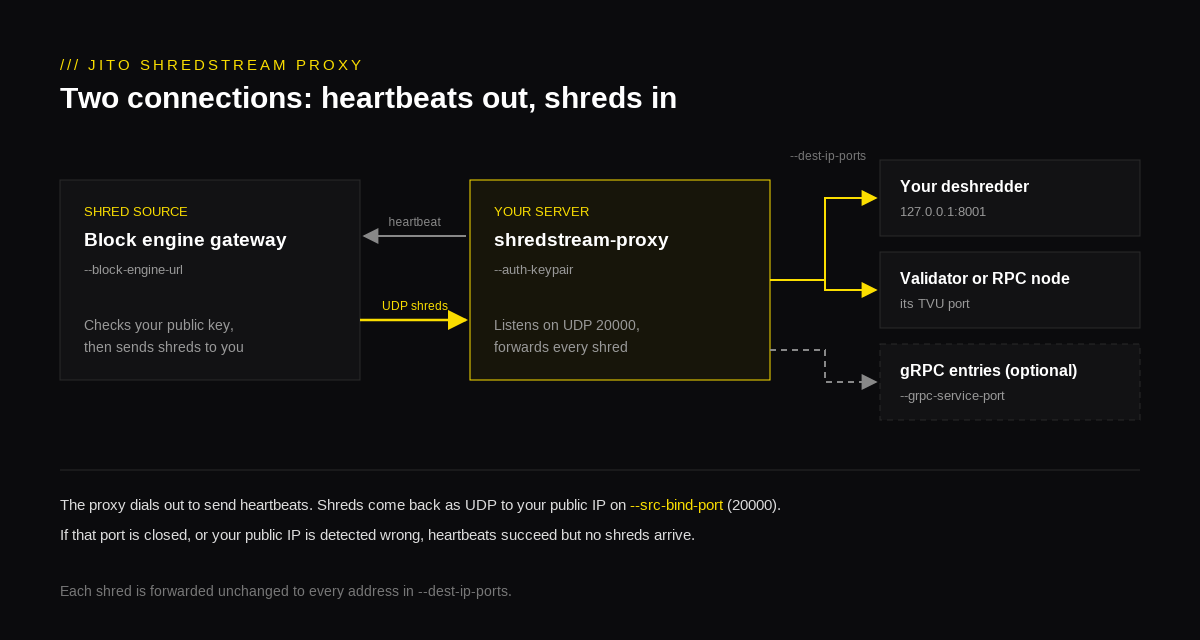
Jito shredstream proxy data path: the proxy sends heartbeats out to the block engine gateway set by --block-engine-url, receives UDP shreds on port 20000, and forwards them to your deshredder, a validator's TVU port, or an optional gRPC entries service
Figure 1: Heartbeats go out over HTTPS. Shreds come back over UDP. Both have to work.

Because the proxy only moves packets, what you get out of it depends entirely on the block engine you point it at. The shreds themselves are standard Solana shreds. Decoding them into transactions is a separate step, covered in how to decode Jito shreds.

02Which proxy build to use in 2026#

On July 13, 2026, Jito added a shutdown check to jito-labs/shredstream-proxy. Any build from that commit onward compares the clock with September 5, 2026. When the date has passed, shredstream mode prints a deprecation notice and exits, whichever block engine you point it at. Older builds still start, but Jito's block engine no longer sends them shreds.

So a 2026 setup needs two things: a build without that check, and a block engine that still serves shreds. This guide uses the NoLimitNodes shredstream proxy, a minimal fork of Jito's proxy under the same Apache 2.0 licence. It has the same binary name, CLI and wire protocol. The shutdown check is removed. If your proxy already stopped, the troubleshooting guide shows the exact messages and fixes.

03Before you start#

  • A Linux server with a public IPv4 address. The prebuilt binary needs x86-64 and glibc 2.31 or newer (Ubuntu 20.04+, Debian 11+). It does not need AVX2.
  • An inbound UDP port. 20000 by default. Shreds are sent to it, so it has to be reachable from the internet.
  • An auth keypair. Any Solana keypair works. It only proves who you are, so it doesn't need funds.
  • A registered public key. The block engine only serves keys it knows. With NoLimitNodes you register it in the dashboard after subscribing to Jito Shreds.
terminal
bash
# Reuse the keypair your proxy already has, or make a new one.
# It only logs in to the gateway, so it never needs to hold SOL.
solana-keygen new --outfile shredstream-keypair.json

# This is the value you register. Never share the file itself.
solana-keygen pubkey shredstream-keypair.json
WARNING / Public key only
Register the public key that solana-keygen pubkey prints. Never paste a private key or the contents of a keypair file into a dashboard, form or support chat.

04Install the proxy#

Option A: the prebuilt binary

Each release ships a Linux x86-64 binary and its SHA-256 checksum. Check the checksum before you run it.

terminal
bash
curl -LO https://github.com/no-limit-nodes/shredstream-proxy/releases/latest/download/jito-shredstream-proxy-x86_64-unknown-linux-gnu
curl -LO https://github.com/no-limit-nodes/shredstream-proxy/releases/latest/download/jito-shredstream-proxy-x86_64-unknown-linux-gnu.sha256
sha256sum -c jito-shredstream-proxy-x86_64-unknown-linux-gnu.sha256
chmod +x jito-shredstream-proxy-x86_64-unknown-linux-gnu
sudo mv jito-shredstream-proxy-x86_64-unknown-linux-gnu /usr/local/bin/jito-shredstream-proxy

Option B: build from source

terminal
bash
# Ubuntu prerequisites
sudo apt-get install -y build-essential clang libclang-dev cmake protobuf-compiler

git clone https://github.com/no-limit-nodes/shredstream-proxy.git
cd shredstream-proxy
RUST_REED_SOLOMON_ERASURE_ARCH=x86-64 cargo build --release --bin jito-shredstream-proxy
# binary: ./target/release/jito-shredstream-proxy

The RUST_REED_SOLOMON_ERASURE_ARCH=x86-64 setting builds the erasure-coding library for generic x86-64, so the binary runs on CPUs without AVX2.

05Every flag that matters#

Run the proxy in shredstream mode. This is the whole command:

terminal
bash
RUST_LOG=info jito-shredstream-proxy shredstream \
  --block-engine-url https://fra.jito.nolimitnodes.com \
  --auth-keypair /path/to/shredstream-keypair.json \
  --desired-regions frankfurt \
  --dest-ip-ports 127.0.0.1:8001
FlagWhat it doesDefault
--block-engine-urlThe gateway that authenticates you and sends shreds. For NoLimitNodes: https://fra.jito.nolimitnodes.comRequired
--auth-keypairPath to the keypair whose public key is registeredRequired
--desired-regionsRegions to receive shreds from, comma separated. The CLI rejects a command without it. The NoLimitNodes gateway serves Frankfurt only and ignores the value for routing, so pass frankfurtRequired
--dest-ip-portsWhere to forward shreds, comma separated IP:port pairs. Each shred goes to every addressNone
--src-bind-portUDP port the proxy listens on for incoming shreds20000
--src-bind-addrLocal address to listen on0.0.0.0
--public-ipThe IP the gateway should send shreds to. Without it the proxy asks ifconfig.meDetected
--grpc-service-portAlso decode shreds into entries and serve them over gRPC on this portOff
--endpoint-discovery-urlAn HTTP JSON endpoint that returns more destination IPs, used with --discovered-endpoints-portOff
--num-threadsForwarding threadsUp to 4
--metrics-report-interval-msHow often counters are logged15000
Table 1: shredstream mode flags. Defaults are from the proxy's source.

Every flag can also be set as an environment variable, which is handy in Docker and orchestration tools:

.env
bash
# Every flag can also be an environment variable: upper case, underscores.
BLOCK_ENGINE_URL=https://fra.jito.nolimitnodes.com
AUTH_KEYPAIR=/app/shredstream-keypair.json
DESIRED_REGIONS=frankfurt
DEST_IP_PORTS=127.0.0.1:8001
SRC_BIND_PORT=20000

What goes in --dest-ip-ports depends on who reads the shreds. For your own decoder, use a local port such as 127.0.0.1:8001. To speed up a validator or RPC node, use its TVU port. The repository's scripts/get_tvu_port.sh prints it.

06Open the UDP port#

This is the step that most often goes wrong. The proxy's heartbeats go out over HTTPS, so login can succeed while every shred is blocked on the way in. Allow inbound UDP on --src-bind-port. With NoLimitNodes, the dashboard shows the source IP shreds come from, so you can allow only that address:

terminal
bash
# ufw: allow shreds in on the proxy's listen port, from the source IP the dashboard shows
sudo ufw allow from <SOURCE_IP> to any port 20000 proto udp

Cloud servers usually have a second firewall: a security group or network ACL. Open the port there too. If the server is behind NAT, forward the port to it, and set --public-ip to the address the world sees.

07Run it as a systemd service#

For a long-running proxy, let systemd restart it if it exits and start it on boot:

shredstream-proxy.service
toml
# /etc/systemd/system/shredstream-proxy.service
[Unit]
Description=Jito shredstream proxy
After=network-online.target
Wants=network-online.target

[Service]
Type=simple
User=shredstream
Environment=RUST_LOG=info
ExecStart=/usr/local/bin/jito-shredstream-proxy shredstream \
  --block-engine-url https://fra.jito.nolimitnodes.com \
  --auth-keypair /etc/shredstream/keypair.json \
  --desired-regions frankfurt \
  --dest-ip-ports 127.0.0.1:8001
Restart=always
RestartSec=5

[Install]
WantedBy=multi-user.target
terminal
bash
sudo systemctl daemon-reload
sudo systemctl enable --now shredstream-proxy
journalctl -u shredstream-proxy -f

Create the shredstream user first, and make the keypair file readable only by that user with chmod 600.

08Run it with Docker#

The repository includes a Dockerfile. Use host networking so the proxy can receive UDP on the host's port and see its real public IP. Mount the keypair read-only.

terminal
bash
git clone https://github.com/no-limit-nodes/shredstream-proxy.git
cd shredstream-proxy
docker build -t shredstream-proxy .

docker run -d --name shredstream-proxy --restart unless-stopped --network host \
  -e RUST_LOG=info \
  -v $(pwd)/shredstream-keypair.json:/app/shredstream-keypair.json:ro \
  shredstream-proxy shredstream \
  --block-engine-url https://fra.jito.nolimitnodes.com \
  --auth-keypair /app/shredstream-keypair.json \
  --desired-regions frankfurt \
  --dest-ip-ports 127.0.0.1:8001

09Check that shreds are arriving#

The proxy logs its own counters every 15 seconds, and resets them after each report, so every line describes the last interval only. Run it with RUST_LOG=info and watch the shredstream_proxy-connection_metrics lines:
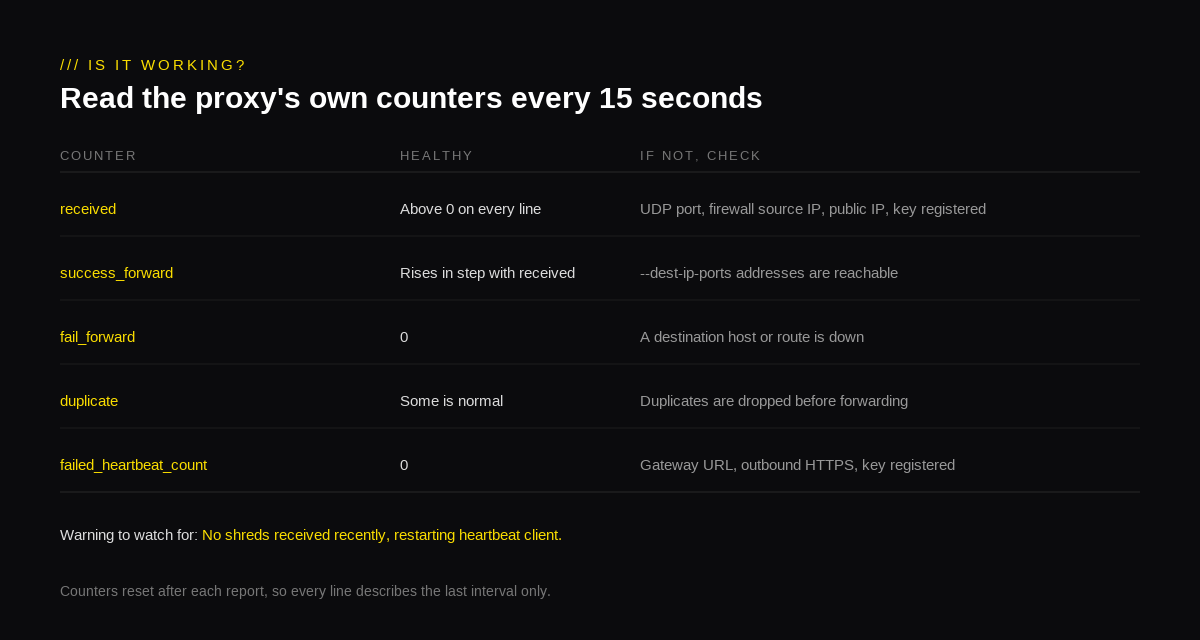
Jito shredstream proxy health check: received should be above zero on every metrics line, success_forward should rise with it, fail_forward and failed_heartbeat_count should be zero, and some duplicates are normal
Figure 2: Five counters tell you whether the proxy is receiving, forwarding and logged in.

If received stays at zero, look below the proxy. Run tcpdump on the listen port. No packets at all means they never reach the machine: a cloud firewall, NAT, a wrong public IP, or a key that isn't registered. Packets in tcpdump but nothing in the proxy means they are dropped on the machine itself. tcpdump sees packets before the host firewall does, so check ufw or iptables, and check the proxy is listening on the port you opened.

terminal
bash
# Are shred packets reaching the machine at all?
sudo tcpdump -n -i any 'udp and dst port 20000' -c 20

One warning matters most: No shreds received recently, restarting heartbeat client. The proxy prints it when a whole interval passes with no shreds, then reconnects. One after a restart is harmless. If it keeps repeating, work through the troubleshooting guide.

NOTE / Where the shreds come from
Already run jito-shredstream-proxy? NoLimitNodes Jito Shreds keeps that setup: point --block-engine-url at our Frankfurt gateway, register your keypair's public key (never the private key), and open UDP 20000. Your --dest-ip-ports and the parser behind it stay as they are. $100 a month for one public key.

10What to do with the shreds#

  1. Feed a validator or RPC node. Forward to its TVU port. The node sees shreds earlier than through Turbine alone.
  2. Decode them yourself. Forward to a local port and rebuild entries and transactions. How to decode Jito shreds walks through it in Rust.
  3. Read entries over gRPC. Add --grpc-service-port and subscribe to decoded entries instead of raw packets.

Shreds are the earliest data, but they carry no execution results. If you need logs, balance changes or errors, pair them with Yellowstone gRPC. See Shredstream vs Yellowstone gRPC for when to use each.

11Frequently asked questions#

Does the Jito shredstream proxy still work after the shutdown?

The program still works, but builds from Jito’s repository since July 13, 2026 exit once September 5, 2026 has passed, and Jito’s block engine no longer serves shreds. Use a build without the shutdown check and a block engine that still serves your keypair.

Which port does the shredstream proxy use?

It listens for incoming shreds on UDP 20000 by default, set with --src-bind-port. That port must accept inbound UDP from the internet. Heartbeats go out separately over HTTPS, so login can succeed while a closed UDP port blocks every shred.

Is --desired-regions still required?

Yes. The proxy’s command line rejects a shredstream command without it. With the NoLimitNodes gateway, which serves Frankfurt only and ignores the value for routing, pass --desired-regions frankfurt.

Does the auth keypair need SOL?

No. The keypair only proves your identity to the block engine. It never signs transactions, so it needs no balance. Register its public key with your provider and keep the file private on the server that runs the proxy.

How do I know the proxy is receiving shreds?

Run it with RUST_LOG=info and watch the connection metrics it logs every 15 seconds. The received counter should be above zero on every line, and fail_forward should stay at zero. tcpdump on UDP 20000 confirms packets reach the machine.

12Get your proxy receiving shreds#

If you already run the proxy, the move is a flag, a registered key and a firewall rule. Get Jito Shreds from NoLimitNodes for $100 a month per public key, or compare it with other shred feeds in Jito shreds pricing in 2026.

Related reading: Jito Shreds Explained · Jito ShredStream Shutdown: How to Migrate · How to Decode Jito Shreds

13Sources#

  • no-limit-nodes/shredstream-proxy on GitHub: README, v0.3.0 release notes and CLI source, checked November 24, 2026
  • jito-labs/shredstream-proxy on GitHub: the “Shredstream deprecation” commit of July 13, 2026
  • Jito docs: ShredStream and the shutdown notice
#jito shreds#jito shredstream proxy#solana shredstream#solana shreds#block engine#jito
N
NoLimitNodes Engineering
Infrastructure Team

The team that runs our RPC, WebSocket, gRPC, and streaming fleet. We write about what we operate: validators, Geyser pipelines, and the request paths in between.

On this page
  • 01What the proxy does
  • 02Which build to use in 2026
  • 03Before you start
  • 04Install the proxy
  • 05Every flag that matters
  • 06Open the UDP port
  • 07Run it with systemd
  • 08Run it with Docker
  • 09Check shreds are arriving
  • 10What to do with the shreds
  • 11FAQ
  • 12Get started
  • 13Sources
↑ back to top
///Read next
GuidesNov 24, 2026

Jito Shredstream Proxy Stopped Working? Why It Exits and How to Fix It

Since the ShredStream shutdown, recent Jito proxy builds stop themselves and older ones receive nothing. The exact messages, the code behind them, and four ways to get Jito shreds again, starting with a one-flag fix.

#jito shreds#jito shredstream proxy#jito shredstream shutdown
7 min read
GuidesNov 17, 2026

Jito Shreds Explained: What Solana Shreds Are and Why Traders Want Them

Jito shreds are ordinary Solana shreds with faster delivery. What a shred contains, data vs coding shreds, Turbine vs shred streams, why traders want them first, and what they cannot tell you.

#solana#jito shreds#solana shreds
8 min read
← Older
Solana RPC Explained: How It Works and How to Use It in Production
Newer →
Jito Shredstream Proxy Stopped Working? Why It Exits and How to Fix It
Jito Shreds

Keep your shredstream proxy. Change one flag.

Point --block-engine-url at NoLimitNodes, keep your keypair and everything downstream, and shreds arrive on UDP 20000. $100 a month for one public key.

Get Jito ShredsSetup guide

Ready to get started?

Choose a plan and start building in under 30 seconds.

Talk to Sales
NoLimitNodes

Solana RPC infrastructure built for performance and scale.

RPC Access
  • Solana HTTP RPC nodes
  • Solana WebSocket nodes
  • Yellowstone gRPC nodes
  • Solana Shredstream
  • UltraSend transaction relay
Infrastructure
  • Compute Platform
  • VPS
  • VDS
  • Bare Metal
  • Geyser Plugin Hosting
Enhanced Streams
  • PumpFun
  • PumpSwap
  • Raydium
  • Orca
  • Meteora
  • System Events
  • Browse all Solana Enhanced Streams →
Program Streams
  • PumpFun
  • PumpSwap
  • Raydium CLMM
  • Orca Whirlpool
  • Meteora DLMM
  • Jupiter Swap
  • Jupiter Perps
  • Kamino Lending
  • Browse all 37 Solana programs →
Trading
  • EZWallet
Analytics
  • Historical Datasets
  • Historical Raw Blocks
Company
  • About
Resources
  • Pricing
  • RPC Rate Limits
  • Custom Development
  • Documentation
  • Blog
  • Academy
  • Support
  • Contact Sales
Compare
  • Yellowstone gRPC vs LaserStream
  • Triton vs Helius
  • Raydium API vs Helius
  • PumpSwap API vs Bitquery
  • QuickNode Streams vs NLN
  • All comparisons →
Legal
  • Terms & Conditions
  • Privacy Policy
© 2026 CLR3 Inc., operating as NoLimitNodes. Registered in Ontario, Canada. All rights reserved.solana mainnet