How to Decode Jito Shreds: Turn Solana Shreds into Transactions
From UDP socket to transaction: receive Jito-compatible shred packets, parse the 83-byte header, buffer and recover FEC sets, deshred into entries, and handle the edge cases that break naive decoders.
On this page +
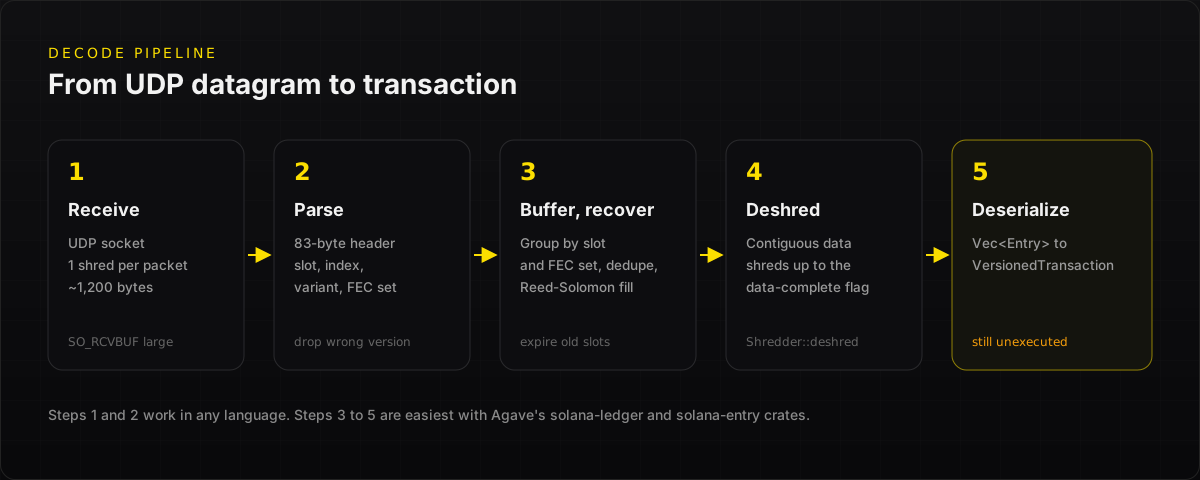
To decode Jito shreds, you receive raw shred packets over UDP, group the data shreds by slot, order them by index, join their payloads up to a “data complete” flag, and deserialize the bytes into Solana entries. Each entry holds a list of transactions you can read before the block finishes executing.
This guide is for developers building sniper bots, MEV searchers, market makers or indexers who already have, or are about to get, a Jito-compatible shred feed. It walks through the pipeline from UDP socket to transaction, shows the header layout, and lists the edge cases that break naive deshredders.
01Where do Jito shreds come from now?#
Jito ShredStream used jito-shredstream-proxy to pull shreds from Jito's Block Engine and forward them to your DEST_IP_PORTS. It could also decode them and stream transactions over gRPC, and the repo includes a deshred example client. Jito announced that its hosted ShredStream service would shut down on September 5, 2026.
The packets themselves are raw Solana shreds, and that is still what most deshredders expect. NoLimitNodes Shredstream sends raw mainnet shreds in a format compatible with the Jito proxy and client path, straight to a UDP port you verify, so the code below works without running the Jito proxy. New to shreds? Start with Jito Shreds Explained.
02Step 1: Receive shred packets#
Each UDP datagram holds one shred. Bind a socket on a public IPv4 host, and keep the receive buffer large, because shred traffic is bursty.
To check that packets are arriving, run sudo tcpdump -n -i any 'udp and dst port 20000'. Jito's docs describe healthy traffic as many packets of about 1,200 bytes.
03Step 2: Parse the shred header#
Every shred starts with an 83-byte common header. Data shreds add a 5-byte data header, and coding shreds add a 6-byte coding header.
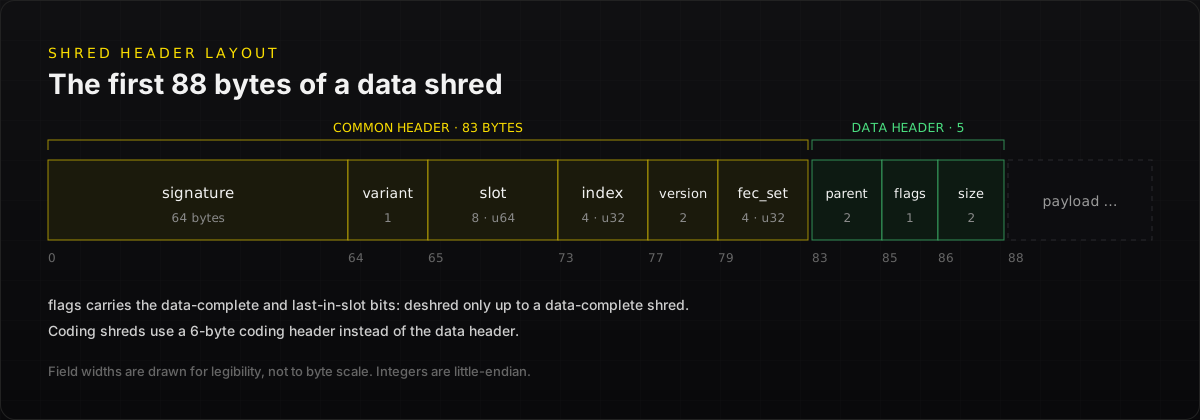
A minimal header parser for routing packets by slot:
Payload bounds also depend on the shred variant. Newer Merkle shreds reserve space at the end of the packet for a Merkle proof. For that reason, do the full payload extraction with the Agave shred types shown in step 4 rather than by hand.
04Step 3: Buffer and recover#
- Group shreds by
slot, then byfec_set_index. - Deduplicate on slot, index and shred type (data or coding). You will see duplicates, especially with more than one feed.
- Recover: if a data shred is missing but you hold enough shreds from its FEC set, run Reed-Solomon recovery with the coding shreds. Agave's
solana-ledgercrate implements this. - Expire buffers for old slots so memory stays bounded.
05Steps 4 and 5: Deshred into entries and transactions#
When you hold a contiguous run of data shreds ending in one with the data complete flag, join their payloads and deserialize the bytes as a Vec<Entry>. Each Entry has num_hashes, hash and transactions.
In Rust, the Agave crates do the heavy lifting. This is the same approach as the deshred example in the Jito proxy repo:
From here, filter on the program IDs you care about, such as Pump.fun, Raydium or Meteora, and decode instructions with their IDLs. Remember that you are reading unexecuted transactions. A swap you see may still fail.
06Edge cases that break deshredders#
Pre-production checklist
- Receiver isolated, with only the shred UDP port exposed. Raw UDP has no authentication or encryption.
- Dedupe, FEC recovery and slot expiry in place
- Packet-rate and deshred-error metrics with alerts
- Unconfirmed transactions confirmed with Yellowstone gRPC before you rely on state
- Agave crate versions pinned and upgraded with the cluster
07Frequently asked questions#
Do I need jito-shredstream-proxy to decode Jito shreds?
No. The proxy received shreds from Jito’s Block Engine, forwarded them, and could stream decoded transactions over gRPC. Decoding itself only needs the raw packets plus Agave’s shred and entry types. With NoLimitNodes Shredstream, Jito-compatible packets arrive directly at your UDP port, with no proxy.
Why do I get deserialization errors when deshredding?
The usual causes are missing or out-of-order data shreds, duplicates, or deshredding across a boundary that is not data-complete. Buffer shreds by slot and index, dedupe them, recover gaps with coding shreds, and only deserialize contiguous runs that end with the data-complete flag.
Can I decode Jito shreds in Python or TypeScript?
You can parse headers and route packets in any language. Payload extraction, Merkle shred handling and Reed-Solomon recovery are easiest with Agave’s Rust crates. A common pattern is a small Rust deshredder that passes transactions to your Python or TypeScript strategy over a local socket or queue.
Are transactions from shreds final?
No. They are what the leader included before execution and voting. The slot can be skipped or land on a fork, and transactions can still fail. Use shreds for the earliest signal, then confirm outcomes with Yellowstone gRPC or RPC at the commitment level you need.
08Start decoding shreds today#
Decoding Jito shreds is a pipeline: receive, parse, buffer, deshred, deserialize. The hard part is getting the packets early and reliably. The code stays the same whichever Jito-compatible feed you use.
Get a Jito-compatible shred feed with NoLimitNodes Shredstream: register a UDP destination, verify it, and point this deshredder at it. Follow the setup docs or talk to sales.
Related reading: Jito Shreds Explained · Migrate from Jito ShredStream · Solana Shredstream Guide
09Sources#
- Jito docs: ShredStream, checked November 17, 2026
- jito-labs/shredstream-proxy on GitHub, including the deshred example
- Agave source: solana-ledger shred module
Every benchmark in this blog runs against our public endpoints.
Spin up an RPC, WebSocket, or gRPC endpoint in under a minute. Flat monthly pricing. Reproduce the numbers for your own workload.