Solana RPC Explained: How It Works and How to Use It in Production
What a Solana RPC node actually does with your request, the handful of methods that matter, and the four settings that decide whether your app holds up on mainnet.
On this page +
Every Solana app talks to the chain through Solana RPC, including wallets, trading bots, explorers and indexers. You send a JSON request to a node and get account data, a block, or a transaction signature back. That part takes five minutes to learn. The hard part comes later, when your app stalls on 429 errors, reads a balance that isn't settled, or sends a transaction that never lands even though you got a signature back.
This guide covers both parts. It explains what an RPC node does with your request and which methods you'll use most. Then it covers the four settings that decide whether your app holds up in production: commitment levels, rate limits, transaction landing, and knowing when to stop polling.
01What is Solana RPC?#
Solana RPC is the JSON-RPC 2.0 interface that Solana nodes expose over HTTP and WebSocket. Apps use it to read accounts, blocks and transactions, to simulate and submit transactions, and to subscribe to changes. Each request is a small JSON object naming a method and its parameters, and the node replies with JSON.
RPC stands for remote procedure call: your code calls a function that runs on someone else's machine. On Solana that machine is an RPC node, a server that runs the same validator software as the rest of the network but doesn't vote. Its whole job is answering questions about the chain and passing transactions along. A minimal request looks like this:
Every SDK, whether @solana/web3.js, @solana/kit, solana-py or the Rust client, is a wrapper that builds these JSON bodies for you. When something goes wrong, it helps to remember that's all that's happening underneath.
02What happens when you call an RPC node#
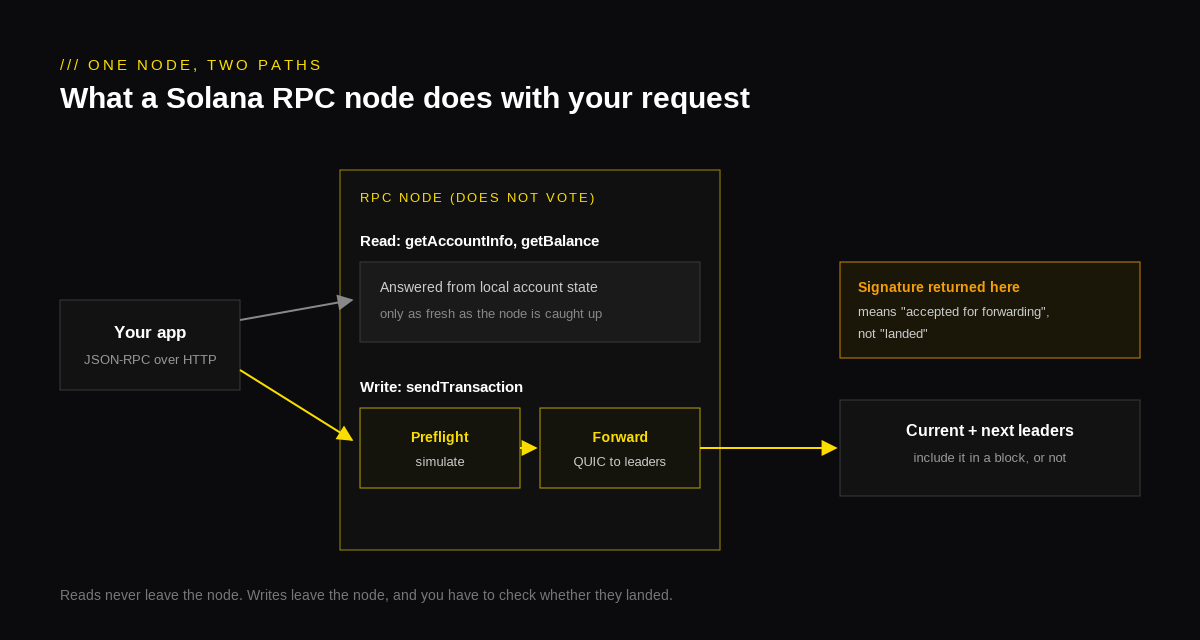
An RPC node keeps its own copy of recent ledger and account state, which it updates as new blocks arrive from the network. That explains most of its behaviour.
Reads are local. When you call getAccountInfo or getBalance, the node answers from its own state. Nothing goes to the validator set, so a read is only as fresh as the node is caught up. A node that has fallen a few slots behind gives you correct-looking data that is a second or two old. That's why getHealth and getSlot are worth calling as probes: they tell you whether the node you're reading from is current.
Writes are forwarded. When you call sendTransaction, the node doesn't execute your transaction. It runs a quick preflight simulation (unless you skip it), then forwards the signed transaction to the current and upcoming block leaders over QUIC. It returns the signature straight away. That signature means "accepted for forwarding", not "landed". We'll come back to that.
History has a horizon. A node only keeps a limited window of recent ledger on disk. Requests for older blocks or transactions (getBlock, getTransaction, getSignaturesForAddress deep into the past) need archival storage behind the node. Public and budget endpoints often can't serve them.
RPC nodes and validators are different jobs. A validator votes and produces blocks. An RPC node serves requests. Anza, which maintains the main validator client, recommends against running both roles on one machine: heavy RPC traffic slows voting, and voting duties starve RPC.
03The RPC methods you'll actually use#
The Solana RPC API has more than 50 HTTP methods and a set of WebSocket subscriptions. Most production apps use about a dozen. Grouped by job:
Two habits save a lot of trouble. First, batch reads: one getMultipleAccounts call for 100 accounts is far cheaper than 100 getAccountInfo calls, for you and for whoever runs the node. Second, ask for the encoding you need. jsonParsed is convenient for token accounts, but base64 with your own decoder is smaller and faster when you know the account layout.
04Commitment levels: the setting behind most RPC bugs#
Almost every read and every send takes a commitment parameter. It tells the node how settled the data must be before it answers. There are three levels:
If you don't pass a commitment, the RPC server uses finalized. Many SDKs set their own default, so check what yours does. The bugs come from mixing levels without meaning to:
- Fetching a blockhash at processed. If that block is later skipped, its blockhash was never valid on the main fork, and your transaction is rejected. Fetch blockhashes at
confirmed. - Simulating at one level and reading at another. Preflight runs at
preflightCommitment. If that'sfinalizedbut your account reads areprocessed, the simulation sees older state than your app does, and preflight fails on state your app has already seen. - Crediting on confirmed. For deposits and anything else that moves money between users, wait for
finalizedor accept the small risk on purpose.
A rule that works for most teams: read UI state at confirmed, build transactions at confirmed, and settle anything financial at finalized. For a deeper explanation, see our glossary entry on processed, confirmed and finalized.
05Public, private, or self-hosted endpoints#
You have three ways to get a Solana RPC endpoint.
The public endpoints are run by the Solana Foundation and are explicitly not meant for production. The official docs list per-IP limits that include 100 requests per 10 seconds overall and 40 per 10 seconds for a single method, plus caps on connections and data. These figures change, so check the Solana RPC docs before relying on them. A wallet with a few hundred users exceeds those limits quickly.
Self-hosting gives you full control, but an RPC node needs more memory and storage than a validator. You also take on upgrades, snapshots and catching up after restarts. Our hardware requirements guide covers the real numbers.
For most teams a private provider is the right call. If you're choosing one, start with our Solana RPC providers comparison and the real monthly cost breakdown. The key questions are how each provider counts a "request", which methods are capped, and whether you need archival history.
06Rate limits and the methods that eat them#
Every endpoint has a rate limit, and when you exceed it you get HTTP 429. What surprises teams is that requests are not equal. Three methods cost far more to serve than the rest:
- getProgramAccounts scans every account owned by a program. Unfiltered on a big program like the SPL Token program, it's enormous. Always pass a
dataSizefilter and at least onememcmpfilter, so the node returns only the accounts you need. - getSignaturesForAddress walks a per-address index. On a busy wallet or a popular program, paging deep into history is slow.
- getBlock with full transaction details serializes every transaction in a block. Ask for
transactionDetails: "signatures"if that's all you need.
Providers often cap these methods separately from your overall requests per second. That's why an app well under its plan limit can still get throttled. When you do get a 429, back off and retry. Don't hammer the endpoint:
Backoff handles the symptom. To reduce the cause, batch account reads, cache data that changes slowly (token metadata, program configs, mint decimals), and replace polling loops with subscriptions. If you're sizing a plan, average requests per second is the wrong number to plan around. Our guide on how many requests per second you actually need covers burst load and method weights.
07Sending transactions that actually land#
sendTransaction returning a signature is where many teams stop looking, and it's where many lost transactions go missing. A transaction lands only if a leader includes it before its blockhash expires. Four steps make that much more likely.
1. Simulate first. simulateTransaction returns logs, errors and the compute units used. Use the compute units to set an accurate setComputeUnitLimit instead of the default. A tighter limit makes your priority fee go further.
2. Set a priority fee. getRecentPrioritizationFees returns recent fees paid for the accounts you pass in. Pass the writable accounts your transaction touches, not an empty list, because demand is local to hot accounts. Pick a percentile of what recent transactions paid, then add it with ComputeBudgetProgram.setComputeUnitPrice. The price is in micro-lamports per compute unit.
3. Respect the blockhash window. A transaction is valid only while its blockhash is among the last 150 blocks. That's roughly 60 to 90 seconds. getLatestBlockhash returns a lastValidBlockHeight along with the hash. Once the chain passes that height, your transaction can never land, and you should rebuild it with a fresh blockhash rather than keep resending.
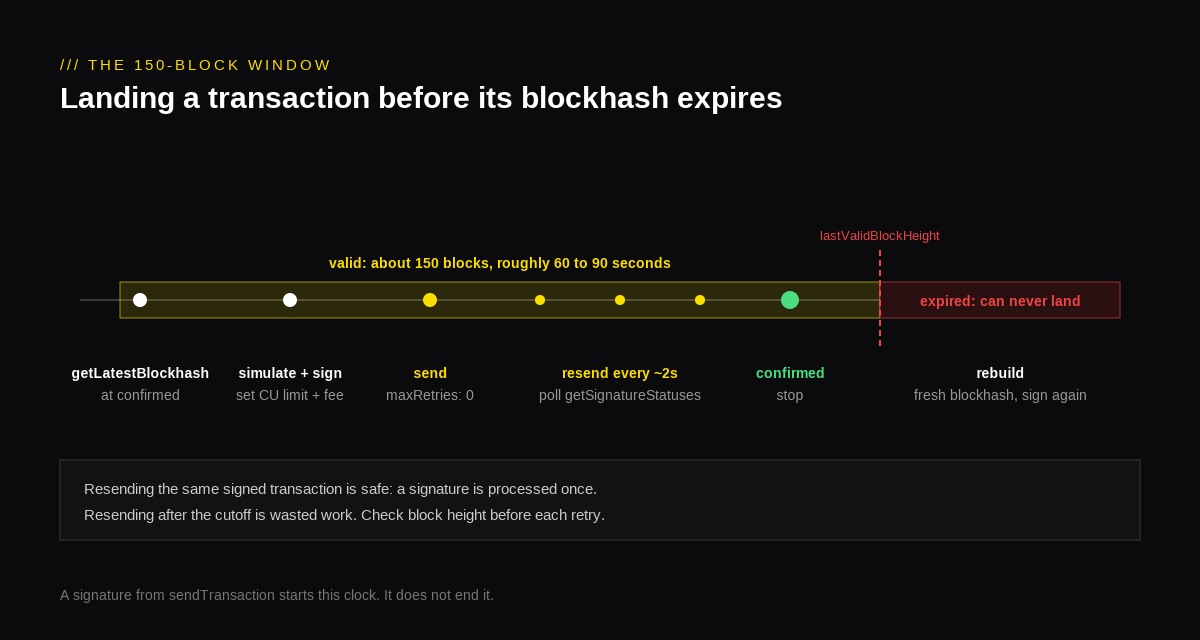
4. Confirm by status, not by hope. By default, the RPC node rebroadcasts your transaction for you. Under load, many teams take over by setting maxRetries: 0 and resending the same signed transaction every couple of seconds until it confirms or the blockhash expires:
Resending the same signed transaction is safe. A signature can only be processed once, so duplicates are dropped. If you trade, you may also send through Jito bundles, which have their own simulation and tip mechanics. That's outside plain RPC, but some providers expose bundle simulation on the same endpoint.
08When RPC is the wrong tool#
Request and response is the right model for "what is this account's state now?" It's the wrong model for "tell me the moment anything changes." If you're calling getAccountInfo in a loop every 400 ms, you're paying for a lot of answers that say nothing has changed.
A common production setup uses all of them. HTTP RPC handles reads and sends, gRPC feeds the indexer, and WebSocket covers the few accounts the UI watches. We compare the streaming options in Yellowstone gRPC vs WebSockets, and the Shredstream guide covers shreds.
09A production checklist for your Solana RPC setup#
Before you ship, check that:
- You're on a private endpoint, with the API key kept server-side or restricted.
- You have at least two endpoints and fail over on
-32005errors, timeouts, or a slot that lags behind. - Commitment is set explicitly on every call:
confirmedfor reads and blockhashes,finalizedfor settlement. getProgramAccountsalways hasdataSizeandmemcmpfilters.- Account reads are batched with
getMultipleAccounts, and slow-changing data is cached. - 429s go through exponential backoff with jitter.
- Transactions are simulated, carry a priority fee based on the writable accounts, and are confirmed by status within the blockhash window.
- Any loop that polls faster than once a second has been reviewed for a move to WebSocket or gRPC.
- You log the method, latency and error code for every RPC call, so you can see which method is eating your limit.
10Frequently asked questions#
What is a Solana RPC endpoint?
A Solana RPC endpoint is the URL of a node that accepts JSON-RPC requests, such as https://api.mainnet-beta.solana.com for the public mainnet. Private providers give you a dedicated URL with an API key. Your app sends HTTP requests there to read chain data and submit transactions, and opens WebSocket connections there for subscriptions.
Is the public Solana RPC free to use in production?
It's free, but it isn't meant for production. The Solana Foundation's public endpoints apply strict per-IP rate limits and may restrict heavy methods. They're fine for learning, scripts and testing. Real users quickly trigger 429 errors, so production apps should use a private provider or their own node.
Why does my Solana transaction not land even though I got a signature?
The signature only means the RPC node accepted the transaction for forwarding. It still has to be included by a leader before its blockhash expires, about 150 blocks later. Add a priority fee, check status with getSignatureStatuses, and rebroadcast until it confirms or the blockhash expires.
Which commitment level should I use?
Use confirmed for most reads and for fetching blockhashes. It's fast, and rollbacks are very rare. Use finalized when crediting deposits or settling funds, because finalized blocks can't change. Use processed only for latency-critical reads where you can handle the occasional rollback.
What's the difference between Solana RPC and Yellowstone gRPC?
Solana RPC is request and response: you ask for data and get an answer. Yellowstone gRPC is a stream: you subscribe with filters, and the node pushes every matching transaction, account update or slot as it happens. Use RPC for reads and sending, and gRPC when you need continuous, high-volume data.
Solana RPC is simple at the protocol level. What separates a working app from a fragile one is how you use it: set commitment on purpose, filter and batch your reads, confirm transactions inside their blockhash window, and stop polling once a stream is the better fit.
If you need a private endpoint for this, NoLimitNodes Solana RPC nodes run on bare-metal servers, authenticate with an x-api-key header, and work with the standard SDKs by swapping the URL. Plans start at 200 requests per second on Pro ($49/month). See pricing for the full tiers.
Related reading: The anatomy of a sub-50ms Solana RPC request · Solana gRPC API guide · Helius alternatives
Every benchmark in this blog runs against our public endpoints.
Spin up an RPC, WebSocket, or gRPC endpoint in under a minute. Flat monthly pricing. Reproduce the numbers for your own workload.