NoLimitNodes
PricingDocsBlogAcademyAboutSupportContact
Log in
Blog/Guides

Jito Shredstream Proxy Stopped Working? Why It Exits and How to Fix It

Since the ShredStream shutdown, recent Jito proxy builds stop themselves and older ones receive nothing. The exact messages, the code behind them, and four ways to get Jito shreds again, starting with a one-flag fix.

N
NoLimitNodes Engineering
Infrastructure Team
Nov 24, 20267 min read
On this page +
  • 01The messages you’ll see
  • 02Why the proxy stops itself
  • 03Four ways to get shreds again
  • 04Fix it with one flag
  • 05Still no shreds after switching?
  • 06FAQ
  • 07Get your shreds back
  • 08Sources

If your jito-shredstream-proxy now exits with Error: Shutdown, or runs but never forwards a shred, the cause is not your server. Jito shut its ShredStream service down on September 5, 2026, and recent builds of the proxy are programmed to stop. This guide shows the exact messages, explains why changing the URL alone won't fix it, and walks through the fixes, from a one-flag change to a full switch to gRPC.

TIP / The short answer
Jito ShredStream is shut down. Proxies built from Jito's repository since July 13, 2026 contain a date check that makes them exit; older builds keep running but receive nothing. To get Jito shreds again, run a proxy build without the check and point --block-engine-url at a provider that still serves shreds.

01The messages you'll see#

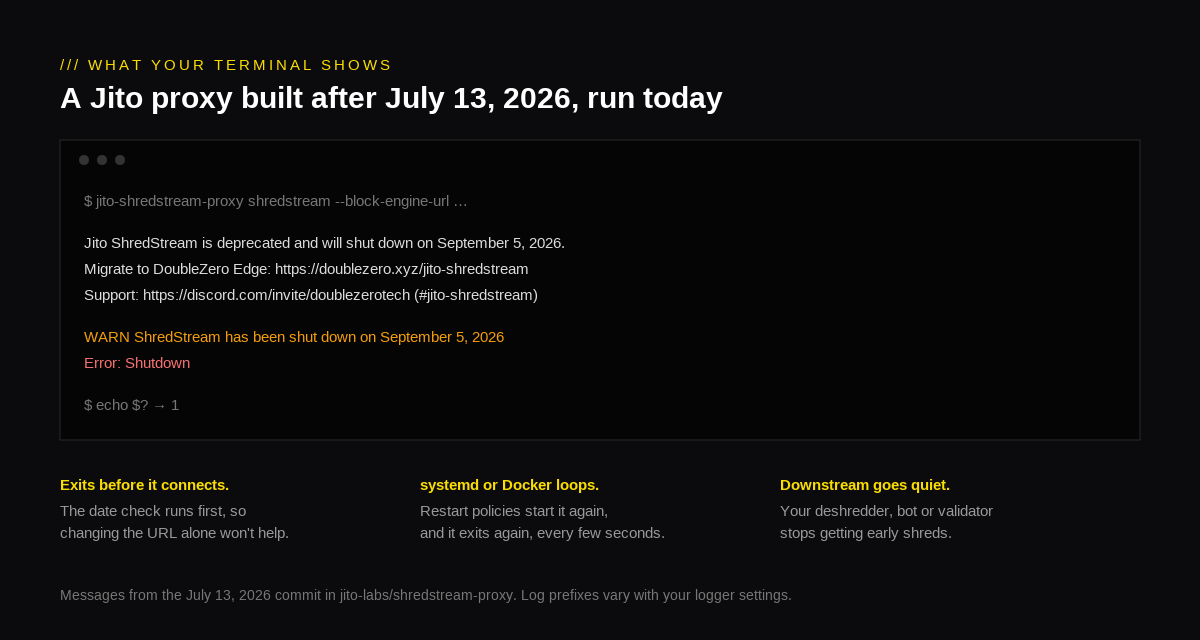
Which messages you get depends on when your proxy was built. A build from Jito's repository after the deprecation commit of July 13, 2026 prints a notice and exits with status 1 as soon as it starts in shredstream mode:
proxy output
text
Jito ShredStream is deprecated and will shut down on September 5, 2026.
Migrate to DoubleZero Edge: https://doublezero.xyz/jito-shredstream
Support: https://discord.com/invite/doublezerotech (#jito-shredstream)

WARN  ShredStream has been shut down on September 5, 2026
Error: Shutdown
Terminal output of jito-shredstream-proxy after the shutdown: the deprecation notice, the warning ShredStream has been shut down on September 5, 2026, and Error: Shutdown with exit status 1
Figure 1: A proxy built after July 13, 2026 stops itself. Under systemd or Docker it restarts and stops again in a loop.

An older build has no date check, so it starts normally. It just never gets shreds, because Jito's block engine no longer serves them. The logs repeat some mix of these warnings, and the received counter stays at zero:

proxy output (older build)
text
WARN  Failed to connect to block engine, retrying. Error: ...
WARN  Error sending heartbeat: ...
WARN  No shreds received recently, restarting heartbeat client.
What you seeWhat it means
Error: ShutdownA build with Jito's date check. It will exit every time, on any URL
A systemd unit or Docker container restarting every few secondsThe same exit, restarted by your restart policy
No shreds received recently, restarting heartbeat client.The proxy runs but no shreds arrive. With Jito's block engine, this is permanent
received at 0 in every metrics lineNothing reaches the proxy. See the checklist below if this persists after you switch
Your bot or validator falls behind, with no errors of its ownDownstream of a silent proxy. Check the proxy first
Table 1: Symptoms and what they mean.

Not sure which build you have? Check:

terminal
bash
# Which build are you running?
jito-shredstream-proxy --version
# If you built from source, which commit?
git -C /path/to/shredstream-proxy log -1 --format='%h %ad %s' --date=short

02Why the proxy stops itself#

Jito announced the deprecation in July 2026 and, on July 13, merged a change to jito-labs/shredstream-proxy titled “Shredstream deprecation”. It adds a hard-coded shutdown time and checks it before doing anything else:

main.rs (excerpt)
rust
// proxy/src/main.rs in jito-labs/shredstream-proxy, added July 13, 2026
const SHREDSTREAM_SHUTDOWN_DATE: &str = "September 5, 2026";
const SHREDSTREAM_SHUTDOWN_UNIX_SECONDS: u64 = 1_788_566_400; // 2026-09-05 00:00 UTC

if matches!(&shredstream_args, ProxySubcommands::Shredstream(_)) {
    eprintln!("Jito ShredStream is deprecated and will shut down on {SHREDSTREAM_SHUTDOWN_DATE}. ...");
    if shutdown_has_passed() {
        warn!("ShredStream has been shut down on {SHREDSTREAM_SHUTDOWN_DATE}");
        return Err(ShredstreamProxyError::Shutdown);
    }
}

Three consequences follow from that code:

  • The URL doesn't matter. The check runs before the proxy connects anywhere, so pointing a stock build at another block engine still exits.
  • The heartbeat stops too. The same check runs inside the heartbeat loop, so a build started before the date stopped heartbeating when it passed.
  • Only shredstream mode is affected. forward-only mode, which relays shreds you already receive (for example over multicast), has no date check.

The proxy is open source under Apache 2.0, so the check can be removed. That's what drop-in providers do: they ship a build without it and run a block engine that serves your keypair.

03Four ways to get shreds again#
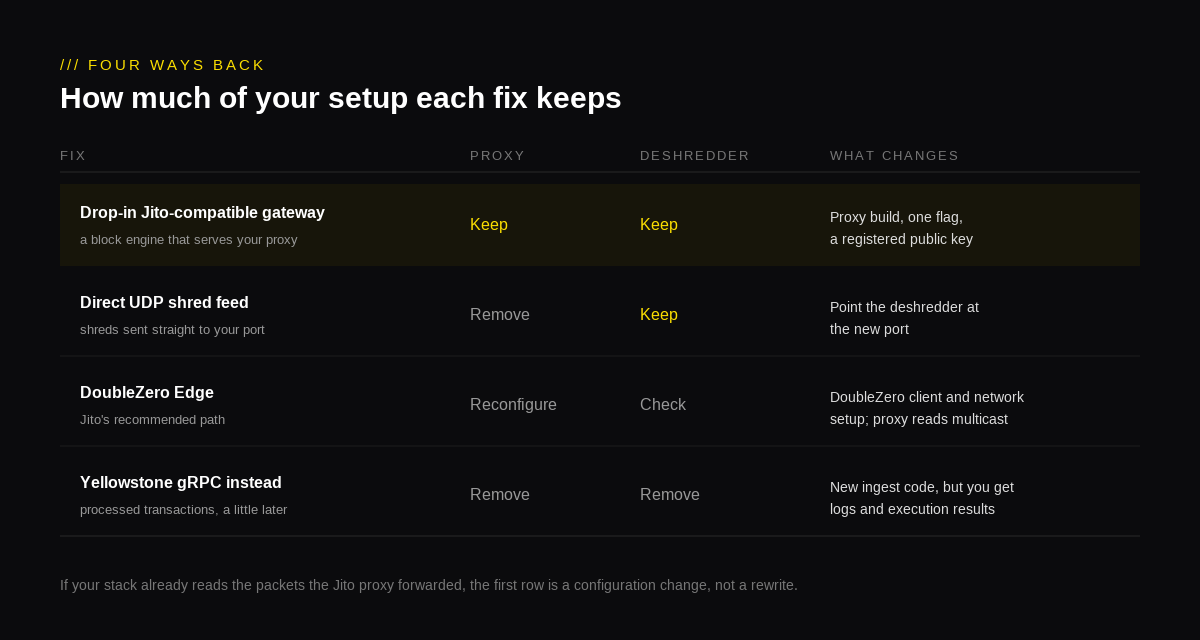
Four fixes for a stopped Jito shredstream proxy compared by what they keep: a drop-in Jito-compatible gateway keeps the proxy and deshredder, a direct UDP shred feed keeps the deshredder, DoubleZero Edge needs a client and network setup, and Yellowstone gRPC replaces both
Figure 2: The closer your fix is to the top, the less of your stack you change.
  1. A drop-in Jito-compatible gateway. Swap the proxy build, change --block-engine-url, register your public key. Your keypair, --dest-ip-ports and everything downstream stay the same. This is the smallest change.
  2. A direct UDP shred feed. The provider sends shreds straight to a port on your server, so there is no proxy to run. Point your deshredder at the new port. The migration guide covers this path with NoLimitNodes Shredstream.
  3. DoubleZero Edge. The path Jito's shutdown notice recommends. It delivers shreds over DoubleZero's network, which needs its own client and network configuration. The proxy can read multicast shreds, but plan for setup work and check DoubleZero's docs for your pipeline.
  4. Yellowstone gRPC instead. If you used shreds only to see transactions early, a Yellowstone gRPC stream gives you processed transactions a little later, with logs and execution results. It means new ingest code. See Shredstream vs Yellowstone gRPC.

Costs differ a lot between these options, from $100 a month to several thousand. We compared published prices in Jito shreds pricing in 2026.

04Fix it with one flag: NoLimitNodes Jito Shreds#

NoLimitNodes Jito Shreds is the first option. It costs $100 a month for one public key and serves Frankfurt. The steps:

1. Subscribe and register your public key

After subscribing, open the Jito Shreds page of the dashboard and paste the public key of the keypair your proxy already uses. solana-keygen pubkey keypair.json prints it. Never paste the private key or the keypair file.

2. Swap the binary

Download the NoLimitNodes shredstream proxy, a minimal fork of Jito's with the shutdown check removed. Same binary name, same flags, same wire protocol. Verify the checksum:

terminal
bash
curl -LO https://github.com/no-limit-nodes/shredstream-proxy/releases/latest/download/jito-shredstream-proxy-x86_64-unknown-linux-gnu
curl -LO https://github.com/no-limit-nodes/shredstream-proxy/releases/latest/download/jito-shredstream-proxy-x86_64-unknown-linux-gnu.sha256
sha256sum -c jito-shredstream-proxy-x86_64-unknown-linux-gnu.sha256
chmod +x jito-shredstream-proxy-x86_64-unknown-linux-gnu

3. Change one flag

before and after
bash
# Before: Jito's build, Jito's block engine
jito-shredstream-proxy shredstream \
  --block-engine-url https://mainnet.block-engine.jito.wtf \
  --auth-keypair keypair.json \
  --desired-regions amsterdam,ny \
  --dest-ip-ports 127.0.0.1:8001

# After: a build without the shutdown check, the NoLimitNodes gateway
jito-shredstream-proxy shredstream \
  --block-engine-url https://fra.jito.nolimitnodes.com \
  --auth-keypair keypair.json \
  --desired-regions frankfurt \
  --dest-ip-ports 127.0.0.1:8001

The gateway serves Frankfurt only. The proxy still requires --desired-regions, so pass frankfurt.

4. Open UDP 20000 and restart

Shreds arrive on UDP 20000 (the proxy's --src-bind-port). Allow it from the source IP shown in the dashboard, restart the proxy, and watch the received counter in the logs. The proxy setup guide has systemd and Docker versions of the command.

05Still no shreds after switching?#

SymptomLikely causeFix
Error: ShutdownThe old binary is still the one runningCheck the path in your systemd unit or Docker image, and rebuild the image
error: the following required arguments were not provided: --desired-regionsThe flag was droppedAdd --desired-regions frankfurt
failed_heartbeat_count risingKey not registered, a typo in the URL, or outbound HTTPS blockedCompare solana-keygen pubkey with the dashboard, and check the URL
received at 0, heartbeats fineInbound UDP blocked, or the gateway sends to the wrong IPOpen UDP 20000 in every firewall layer. Behind NAT, forward the port and set --public-ip
fail_forward above 0A --dest-ip-ports address is unreachableCheck the destination host and route
Proxy healthy, bot still silentThe bot listens on a different port than --dest-ip-portsMatch the ports
Table 2: The usual causes once the proxy is on a working gateway.
NOTE / Back to shreds in one flag
Already run jito-shredstream-proxy? NoLimitNodes Jito Shreds keeps that setup: point --block-engine-url at our Frankfurt gateway, register your keypair's public key (never the private key), and open UDP 20000. Your --dest-ip-ports and the parser behind it stay as they are. $100 a month for one public key.

06Frequently asked questions#

What does "Error: Shutdown" mean in jito-shredstream-proxy?

Your build includes the shutdown check Jito added on July 13, 2026. In shredstream mode it compares the clock with September 5, 2026 and exits once that date has passed, before connecting anywhere. A build without the check is needed to keep running.

Can I keep using the proxy by changing --block-engine-url?

Not with a recent Jito build: the date check runs before the proxy connects, so it exits whichever URL you set. Switch to a build without the check, such as the NoLimitNodes fork, and point --block-engine-url at a provider that serves your keypair.

Why does my older proxy run but forward nothing?

Builds from before July 13, 2026 have no date check, so they start normally. But Jito’s block engine no longer sends shreds, so the received counter stays at zero and the proxy keeps restarting its heartbeat client.

What did Jito recommend instead of ShredStream?

Jito’s shutdown notice points to DoubleZero Edge, which delivers shreds over DoubleZero’s own network and needs its client and network setup. Drop-in gateways and direct UDP feeds from other providers are the alternatives that keep more of your existing setup.

07Get your shreds back#

The shutdown removed Jito's feed, not the proxy's usefulness. If your stack is built around jito-shredstream-proxy, the quickest fix keeps it. Get Jito Shreds from NoLimitNodes and change one flag.

Related reading: Jito shredstream proxy setup · Jito ShredStream Shutdown: How to Migrate · Jito Shreds Explained

08Sources#

  • jito-labs/shredstream-proxy on GitHub: commit b96e369 “Shredstream deprecation (#71)”, July 13, 2026
  • Jito docs: ShredStream and the shutdown notice
  • DoubleZero: Jito ShredStream migration
  • no-limit-nodes/shredstream-proxy on GitHub, checked November 24, 2026
#jito shreds#jito shredstream proxy#jito shredstream shutdown#solana shredstream#troubleshooting#jito
N
NoLimitNodes Engineering
Infrastructure Team

The team that runs our RPC, WebSocket, gRPC, and streaming fleet. We write about what we operate: validators, Geyser pipelines, and the request paths in between.

On this page
  • 01The messages you’ll see
  • 02Why the proxy stops itself
  • 03Four ways to get shreds again
  • 04Fix it with one flag
  • 05Still no shreds after switching?
  • 06FAQ
  • 07Get your shreds back
  • 08Sources
↑ back to top
///Read next
GuidesNov 24, 2026

How to Set Up the Jito Shredstream Proxy in 2026: Flags, systemd and Docker

Which proxy build still runs after the ShredStream shutdown, every flag that matters, systemd and Docker setups, the firewall rule that most often breaks it, and the counters that prove Jito shreds are arriving.

#jito shreds#jito shredstream proxy#solana shredstream
10 min read
GuidesNov 17, 2026

Jito Shreds Explained: What Solana Shreds Are and Why Traders Want Them

Jito shreds are ordinary Solana shreds with faster delivery. What a shred contains, data vs coding shreds, Turbine vs shred streams, why traders want them first, and what they cannot tell you.

#solana#jito shreds#solana shreds
8 min read
← Older
How to Set Up the Jito Shredstream Proxy in 2026: Flags, systemd and Docker
Newer →
Jito Shreds Pricing in 2026: What a Solana Shred Feed Costs Now
Jito Shreds

Keep your shredstream proxy. Change one flag.

Point --block-engine-url at NoLimitNodes, keep your keypair and everything downstream, and shreds arrive on UDP 20000. $100 a month for one public key.

Get Jito ShredsSetup guide

Ready to get started?

Choose a plan and start building in under 30 seconds.

Talk to Sales
NoLimitNodes

Solana RPC infrastructure built for performance and scale.

RPC Access
  • Solana HTTP RPC nodes
  • Solana WebSocket nodes
  • Yellowstone gRPC nodes
  • Solana Shredstream
  • UltraSend transaction relay
Infrastructure
  • Compute Platform
  • VPS
  • VDS
  • Bare Metal
  • Geyser Plugin Hosting
Enhanced Streams
  • PumpFun
  • PumpSwap
  • Raydium
  • Orca
  • Meteora
  • System Events
  • Browse all Solana Enhanced Streams →
Program Streams
  • PumpFun
  • PumpSwap
  • Raydium CLMM
  • Orca Whirlpool
  • Meteora DLMM
  • Jupiter Swap
  • Jupiter Perps
  • Kamino Lending
  • Browse all 37 Solana programs →
Trading
  • EZWallet
Analytics
  • Historical Datasets
  • Historical Raw Blocks
Company
  • About
Resources
  • Pricing
  • RPC Rate Limits
  • Custom Development
  • Documentation
  • Blog
  • Academy
  • Support
  • Contact Sales
Compare
  • Yellowstone gRPC vs LaserStream
  • Triton vs Helius
  • Raydium API vs Helius
  • PumpSwap API vs Bitquery
  • QuickNode Streams vs NLN
  • All comparisons →
Legal
  • Terms & Conditions
  • Privacy Policy
© 2026 CLR3 Inc., operating as NoLimitNodes. Registered in Ontario, Canada. All rights reserved.solana mainnet