Jito ShredStream Shutdown: How to Migrate Your Shred Feed
Jito announced its hosted ShredStream would shut down on September 5, 2026. What the service did, who loses what, the alternatives, and a four-step migration that keeps your existing deshredder.
On this page +
Jito ShredStream was Jito Labs' service for streaming raw Solana shreds from block leaders to traders, searchers and RPC operators. Jito's documentation announced that ShredStream would be completely shut down on September 5, 2026, and pointed users to a migration path. If your bot, indexer or RPC node depended on Jito shreds, you need a new source for the same data.
This guide is for teams that ran jito-shredstream-proxy or consumed Jito shreds in production. It explains what Jito ShredStream did, what you lose without it, and how to move to a feed that sends the same Jito-compatible packets, so your receiver and deshredder keep working.
01What was Jito ShredStream?#
Jito ShredStream delivered low-latency shreds from Solana leaders to approved clients. According to Jito, it could save “hundreds of milliseconds” during trading. It also gave servers in less-connected regions a redundant path for shreds.
Access worked like this:
- Approval: you got a Solana public key approved through Jito's Discord.
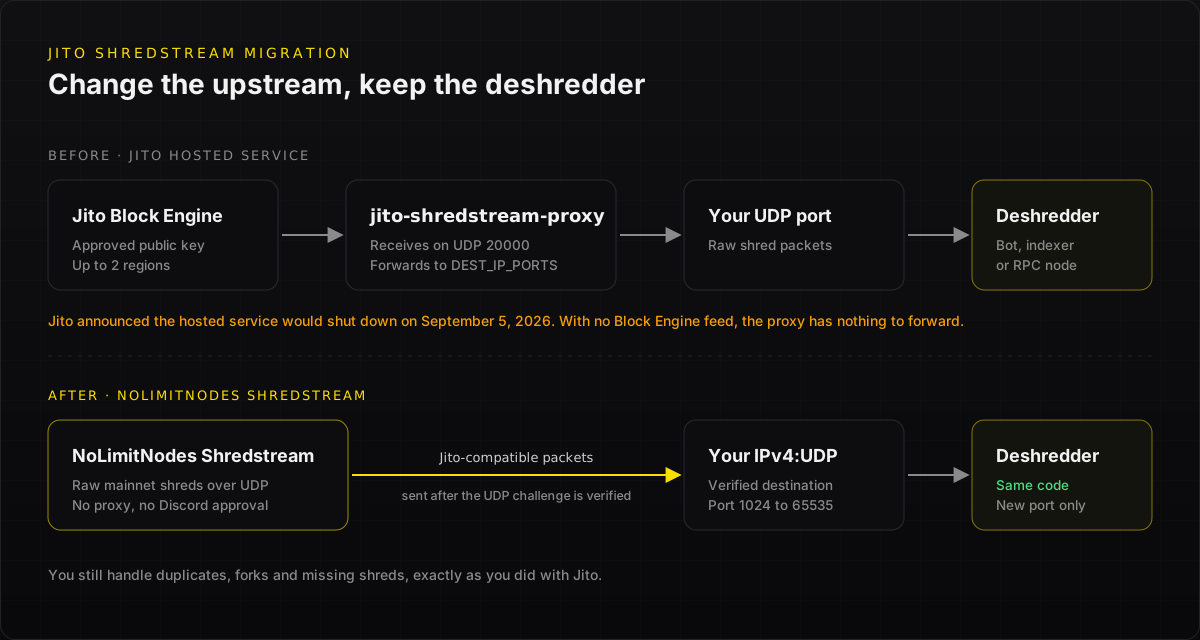
- Proxy: you ran the open-source jito-shredstream-proxy (Apache-2.0), which authenticated to Jito's Block Engine with that keypair.
- Regions: you chose up to two regions with
DESIRED_REGIONS, such asamsterdam,ny. - Delivery: the proxy received shreds on UDP port 20000 by default and forwarded them to the
IP:portdestinations inDEST_IP_PORTS. Optionally, it ran a gRPC service that streamed decoded transactions.
If you want to understand shreds themselves first, read Jito Shreds Explained or the Solana shred glossary entry.
02What changed with the Jito ShredStream shutdown?#
Jito's documentation added a deprecation notice saying the service would be “completely shut down in 60 days (September 5, 2026).” It recommends moving to DoubleZero Edge, whose transition guide includes a free trial.
Once the hosted service stops:
- No new approvals: Jito ShredStream approvals and auth keypairs no longer give you a feed.
- No upstream feed:
jito-shredstream-proxyinshredstreammode has no Jito Block Engine feed to connect to. - Silent receivers: anything downstream of the proxy, such as RPC nodes using it as a shortcut for shreds, deshredders and trading bots, stops getting early shreds and falls back to normal Turbine propagation.
03Who is affected?#
If your workload needs execution results such as logs, balance changes or errors, shreds were never the right tool. A Yellowstone gRPC stream gives you processed transactions with commitment levels. See Shredstream vs Yellowstone gRPC for when to use each.
04Jito ShredStream alternatives compared#
The deciding question is whether you want to rewrite your ingest path. If your stack already deshreds the packets the Jito proxy forwarded, a Jito-compatible feed is a configuration change, not a rewrite. For a side-by-side of the two services, see Jito ShredStream vs NoLimitNodes.
05How to migrate from Jito ShredStream to NoLimitNodes#
NoLimitNodes Shredstream sends raw Solana mainnet shreds over UDP to a public IPv4 address and port that you verify. Packets are compatible with the Jito proxy and client receiving path, so an existing Jito-compatible receiver and deshredder can be reused.
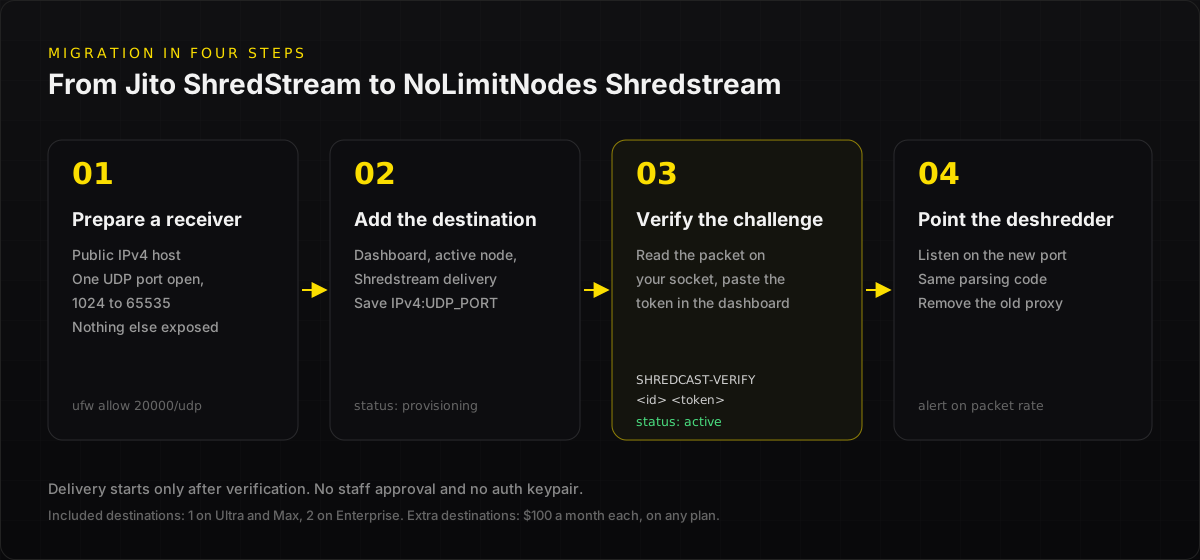
Step 1: Prepare a receiver
Use a host with a public IPv4 address and open one UDP port, from 1024 to 65535, for the feed. Raw UDP carries no NoLimitNodes authentication or encryption, so isolate the receiver and expose only that port.
Step 2: Add the destination
Sign in at dash.nolimitnodes.com, open an active node, find Shredstream delivery, and save your IP:port. Ultra and Max each include one destination, and Enterprise includes two. You can also buy extra destinations at $100 a month each on any plan, including Free.
Step 3: Verify with the UDP challenge
NoLimitNodes sends a one-time SHREDCAST-VERIFY <id> <token> packet to your socket. Paste the token back into the dashboard to prove you control the address. Delivery starts after verification, with no staff approval. Full steps are in the Shredstream setup docs, and firewall rules are in the firewall docs.
Step 4: Point your existing deshredder at the new port
Before, packets came from jito-shredstream-proxy forwarding to DEST_IP_PORTS. Now NoLimitNodes sends them straight to your verified destination. Your deshredder keeps parsing the same packets. You still handle deduplication, forks and missing shreds, just as you did with Jito. The Jito-compatible client docs map each proxy setting to its NoLimitNodes equivalent.
Migration checklist
- Public IPv4 receiver with one UDP port open, and nothing else exposed
- Destination saved and UDP challenge verified in the dashboard
- Deshredder listening on the new port
- Duplicate and fork handling tested on live traffic
- Old
jito-shredstream-proxycontainers and firewall rules for Jito IPs removed - Alerting on packet rate, so a silent feed pages you
06Frequently asked questions#
Is Jito ShredStream still available?
Jito’s documentation announced that its hosted ShredStream service would be completely shut down on September 5, 2026, and recommended migrating to DoubleZero Edge. Teams that still need raw shreds can move to another provider. NoLimitNodes Shredstream sends packets compatible with the Jito proxy and client path, so existing receivers keep working.
Can I keep using jito-shredstream-proxy?
The proxy’s shredstream mode authenticates to Jito’s Block Engine to receive shreds, so it has no upstream feed once the hosted service is shut down. With NoLimitNodes, shreds arrive directly at your verified UDP destination. Your deshredding code can stay the same because the packets are Jito-compatible.
What is the difference between Jito shreds and NoLimitNodes shreds?
Both are raw Solana shreds produced by the slot leader and delivered over UDP before the block finishes executing. The difference is the delivery network and access model. NoLimitNodes Shredstream sends Jito-compatible packets to destinations you verify in its dashboard, with no Discord approval or auth keypair.
Do shreds include logs or transaction errors?
No. Raw shreds contain the leader’s block data before execution. They have no logs, errors, balance changes, compute usage or commitment levels. If you need execution results, use Yellowstone gRPC alongside shreds: shreds for the earliest signal, and gRPC for confirmed outcomes.
How much does a Shredstream destination cost on NoLimitNodes?
Ultra and Max each include one Shredstream destination, and Enterprise includes two. Extra destinations cost $100 a month each and can be added on any plan, including Free. See the pricing page for current plan prices.
07Keep your shred feed running#
The Jito ShredStream shutdown removes one upstream source but does not change what shreds are or how you decode them. If your stack already reads the packets Jito's proxy forwarded, the fastest migration is a feed that sends the same packets.
Get NoLimitNodes Shredstream: register a destination yourself and keep your existing deshredder. Compare plans on the pricing page, or talk to sales about volume or regions.
Related reading: Jito Shreds Explained · How to Decode Jito Shreds · Solana Shredstream Guide
08Sources#
Every benchmark in this blog runs against our public endpoints.
Spin up an RPC, WebSocket, or gRPC endpoint in under a minute. Flat monthly pricing. Reproduce the numbers for your own workload.