Solana Validator and RPC Hardware Requirements in 2026: What the Docs Don't Tell You
What the official hardware page doesn't say: real CPU, RAM, NVMe, and network specs for running a Solana validator or RPC node in production in 2026.
On this page +
The Solana Foundation's hardware requirements page is a floor. Most operators who treat it as a target find out why within six months.
The minimum specs have barely changed since 2022. The chain hasn't. Solana's accounts database is meaningfully larger. Network throughput requirements have grown. The NVMe write pressure on a validator running a full stake is heavier than it was when those figures were last updated. Using 2022 guidance on a 2026 chain is how validators go delinquent on hardware that looks, on paper, like it should be fine.
We run validators and RPC nodes on bare metal in Frankfurt. What follows is what we've actually learned about where the official guidance falls short and what it costs you when it does.
01Validator vs RPC: Different Jobs, Different Bottlenecks#
They run the same software. They don't have the same hardware problem.
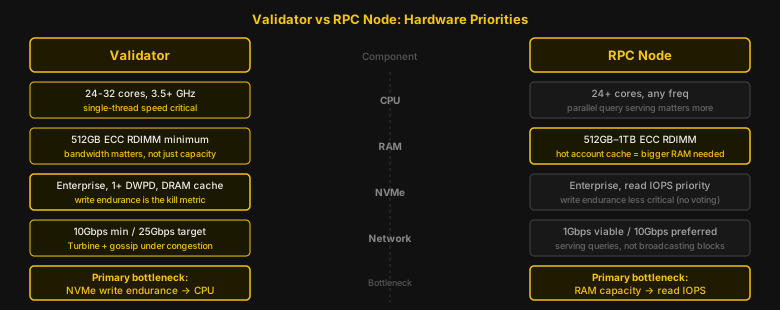
A validator votes. It replays every transaction in every block, updates the accounts database every slot, and participates in consensus. The workload is write-heavy and latency-sensitive. CPU single-thread performance and NVMe write endurance are the two things that determine whether you stay in the active set or go delinquent.
An RPC node doesn't vote. It serves queries: getBlock, getAccountInfo, getTransaction, getProgramAccounts. The workload is read-heavy. Under concurrent query load, it's RAM-heavy. You need less NVMe write endurance and more memory to keep hot account state in cache. A Geyser-enabled RPC node streaming decoded events also adds CPU overhead for the plugin processing path.
This distinction matters because the upgrade order is different. On a validator, you fix NVMe before RAM. On an RPC node, you fix RAM before NVMe.
02CPU: The Thing That Surprises People#
The instinct is to buy more cores. That's wrong.
Solana's proof-of-history computation runs on a single core. Block replay is parallelized, but the critical path through PoH is sequential. A validator with 12 fast cores at 3.8 GHz will consistently outperform a 64-core server running at 2.5 GHz. We've measured this directly. The slower machine misses votes during congested epochs even when the fast one has headroom.
In 2026, AMD EPYC 9004 and 9005 series (Genoa and Turin) are the standard for production validators. The EPYC 9354P (32 cores, 3.25 GHz base, 3.8 GHz boost) or the EPYC 9254 (24 cores, higher per-core frequency) are what serious operators are actually running. Both offer the memory bandwidth that comes with EPYC's 12-channel DDR5 architecture, which matters for accounts database performance more than core count does.
Intel Xeon Emerald Rapids works too. The single-thread scores are comparable on recent generations. What you lose is memory bandwidth, which shows up as accounts DB pressure under load rather than CPU saturation. Either platform is viable. Neither is a gaming CPU, a workstation CPU, or a Threadripper. Those fail under sustained single-thread validator load in ways that are hard to diagnose because they look like NVMe or network problems first.
Core count floor: 24 cores. Not because you need 24 threads active. You don't. You need the thermal headroom. Running PoH at full tilt on a 16-core chip at 4.0 GHz burns the chip at temperatures that trigger throttling. Throttling introduces latency. Latency misses votes.
03RAM: 256GB Is Not Enough Anymore#
The official docs say 256GB. That number was accurate in 2021.
The Solana accounts database has grown. The active account set has expanded with each major protocol deployment. A validator in 2026 running 256GB will show acceptable performance during low-activity periods. During congested epochs (token launches, high-volume DEX activity, network stress events), it hits memory pressure and the performance curve falls off fast.
512GB ECC RDIMM is the 2026 production floor for validators. Many serious operators are at 768GB or 1TB. RPC nodes serving heavy query traffic need 512GB minimum and more if they're handling concurrent getProgramAccounts calls across large programs.
Two things about RAM that matter beyond the number:
- ECC isn't optional. A single bit flip in the wrong memory address corrupts the accounts database. It won't surface immediately. The validator continues to run, the state drifts, and the problem surfaces as a fork that can't be resolved. There have been documented mainnet incidents where non-ECC RAM on a validator was the root cause. Every operator we know who tried to save money on ECC replaced the hardware eventually. Usually after an incident.
- Memory bandwidth matters as much as capacity. That's why EPYC dominates production validator deployments. EPYC's 12-channel DDR5 memory controller gives roughly 3× the memory bandwidth of a desktop platform at the same RAM capacity. The accounts database does random reads and writes across a huge working set. Bandwidth-constrained memory is the bottleneck that looks like an NVMe problem (slow slot processing, high replay latency) and isn't.
04NVMe: Where Most Validators Break#
That's the section that matters most. More validators fail here than anywhere else.
You need two drives. Not two partitions on one drive. Two physically separate NVMe devices, mounted separately.
- Drive 1: Ledger (
/mnt/ledgeror equivalent). That's where RocksDB writes the transaction history. Write-intensive. The ledger grows at roughly 400–800GB per month depending on network activity. You want high write endurance here, not peak read speed. - Drive 2: Accounts (
/mnt/accounts). That's the live accounts database. High mixed IOPS: constant random reads and writes every slot. If this drive is slow, the validator falls behind on replay. Falling behind on replay means missing votes. Missing votes means delinquency.
Running both on a single NVMe drive is the most common mistake we see. The I/O patterns conflict. Ledger sequential writes compete with accounts random reads/writes. The drive can handle either workload in isolation. It can't handle both simultaneously at the throughput Solana requires.
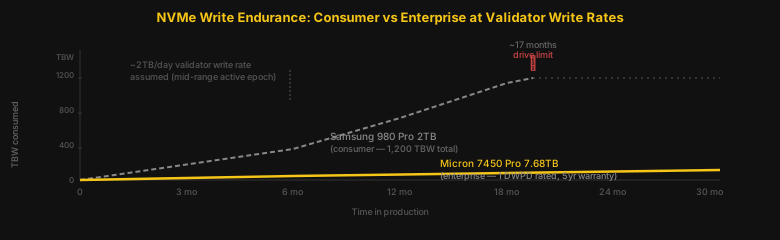
Enterprise NVMe only. The three drives that appear most in production validator builds in 2026: Micron 7450 Pro, Samsung PM9A3, Kioxia CM6-V. What these have in common: PCIe 4.0, DRAM cache on the controller (not HMB; host-memory buffer isn't the same thing), and write endurance ratings measured in DWPD (drive writes per day) rather than TBW.
The Micron 7450 Pro 7.68TB is rated at 1 DWPD. At 7.68TB capacity, that's 7.68TB of writes per day before you're consuming the rated endurance. A Solana validator writes roughly 1–3TB to the ledger drive per day. On a 7.68TB enterprise drive you have real headroom. On a Samsung 980 Pro 2TB (1,200 TBW total lifetime, not per day), sustained validator writes eat through the rated endurance in under 18 months. Faster during high-activity periods.
The difference in behaviour when consumer NVMe degrades is subtle at first. Write latency creeps up. The validator starts falling a few slots behind. You check CPU: fine. You check network: fine. You check RAM: fine. The drive is dying and it's not telling you loudly. It's telling you quietly through slot lag.
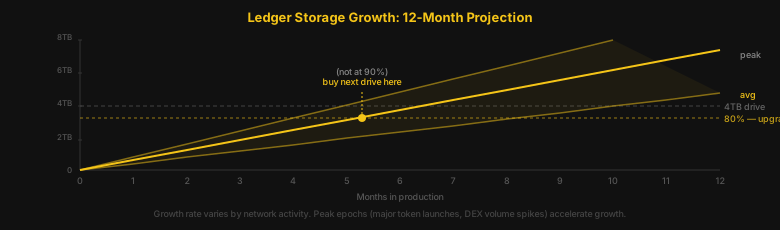
4TB minimum per drive in 2026. 8TB is better. Capacity for the ledger drive specifically: the validator prunes old history but there's a lag window between what's on disk and what's been pruned. Planning for growth now is cheaper than an emergency NVMe swap during a congested epoch.
05Network: The Silent Delinquency Cause#
Validators are network nodes. That should be obvious. It's still underestimated.
Solana runs two concurrent network protocols: Turbine for block propagation and gossip for cluster coordination. During peak epochs, a heavily staked validator is simultaneously receiving block shreds from Turbine and maintaining gossip with thousands of peers. At 1Gbps, this saturates the link during congestion. Missed shreds become missed votes. Missed votes become delinquency.
10Gbps symmetric is the practical minimum in 2026. 25Gbps is what production operators are targeting. The hardware to get there is a Mellanox ConnectX-5 or ConnectX-6 (25GbE). These NICs handle the interrupt load from high packet-per-second traffic better than budget NICs at 10GbE. A cheap 10GbE card that can't keep up at PPS peaks behaves like a slow link even when the link itself has headroom.
Geographic placement matters more than most guides mention. Solana's validator cluster has geographic concentration: Frankfurt/EU, US East, and US West make up the majority of stake. A validator in Singapore or South America isn't disqualified, but it faces higher latency to the cluster's critical mass. Higher latency means slower gossip propagation, which means you're sometimes the last to know about a fork. Not fatal. Not ideal.
DDoS exposure: validators run on public IP addresses and are listed in the gossip cluster. We've seen flood attacks on validator IPs during contentious governance periods. Hardware-level DDoS mitigation on the network provider side is worth factoring into hosting decisions.
06When to Upgrade: The Signals Before the Failure#
Most hardware failures in validators don't announce themselves. They degrade.
Here's what degrading hardware usually looks like:
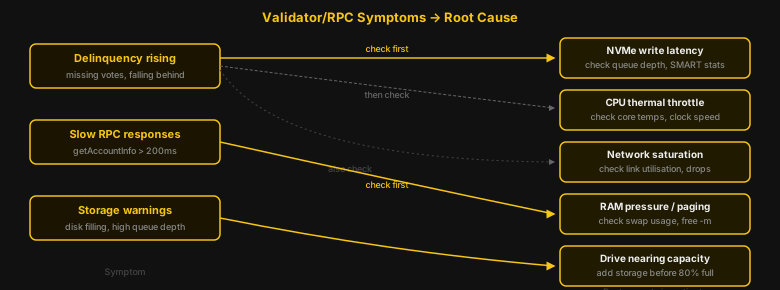
- Delinquency creeping up from 0% toward 1–2%. Not a crash. Not an error. Just gradually missing more votes. Check NVMe write latency first. If write latency on the accounts drive is spiking above 1ms during slot processing, that's the bottleneck. Check CPU thermals second. Thermal throttling on a CPU running hot silently drops the clock speed during PoH computation.
- RPC latency growing past 200ms on
getAccountInfo. Usually RAM pressure. When the accounts database working set no longer fits in available RAM, the OS starts paging. Pages are expensive.getAccountInfogoes from microseconds to hundreds of milliseconds. Adding RAM fixes this. Optimizing queries doesn't. - Ledger drive showing high queue depth. When the ledger NVMe starts queuing writes rather than completing them immediately, it's either saturated or degrading. A healthy enterprise NVMe should have a queue depth near 1 during normal operation. Sustained queue depth of 4+ during replay is the drive telling you it can't keep up.
- Storage hitting 80%. Buy the next drive now. Not at 90%. Not at 95%. At 80%, because emergency NVMe swaps during epoch transitions are exactly as stressful as they sound.
07What We've Actually Replaced and Why#
We've been running production validators and RPC nodes since Solana mainnet-beta. Here's the honest list of what we've swapped out and what drove each decision.
- Consumer NVMe → enterprise NVMe, months 8–12. Every time. Without exception. The write endurance on consumer drives doesn't survive a full year of production validator load. The failure mode is gradual: slot lag, then growing delinquency, then a non-recoverable write error that takes the validator offline. We don't run consumer NVMe anymore. We stopped recommending it to customers years ago.
- 256GB → 512GB RAM, roughly 18 months after initial setup. The accounts database growth is slow enough that 256GB seems adequate for the first year. It isn't adequate for the second. The upgrade is predictable enough that we now provision 512GB on day one.
- 1Gbps → 10Gbps, after first congested epoch. This one is embarrassing in retrospect. We had a validator miss 3% of votes during a high-activity period and spent two days debugging CPU and NVMe before checking the network link. The link was saturated. The fix was a 10Gbps upgrade. Two days of missed votes because we didn't look at the network first.
- Single NVMe → dual NVMe, early. We separated ledger and accounts within the first month on every new build now. The I/O contention on a single drive shows up immediately under load. This one's easy to get right from the start.
08Frequently Asked Questions#
Can I run a Solana validator on a gaming PC or high-end desktop?
No. Consumer platforms (Ryzen, Core i9, Threadripper) lack ECC support, memory bandwidth, and sustained single-thread stability under validator load. They look fine in benchmarks. They fail under production validator conditions, usually through gradual slot lag rather than a clean crash.
Is there a meaningful cost difference between running a validator and an RPC node?
The hardware cost is similar. The operational profile differs. An RPC node under heavy query load needs more RAM and more CPU headroom for serving concurrent requests. A validator under full stake needs more NVMe write endurance. Neither is cheaper to spec correctly.
Do I need a GPU to run a Solana validator?
No. Some high-performance operators use GPU acceleration for PoH verification. It's not required for a standard voting validator. If you're choosing between buying a GPU and buying better NVMe or more RAM, buy the NVMe and RAM first.
How many NVMe drives do I actually need?
Two, minimum. One for the ledger, one for the accounts database. Some operators add a third for snapshots. The critical thing is that the ledger and accounts drives are physically separate: same-drive deployments fail under combined I/O load.
What happens if my validator goes delinquent?
It stops earning rewards and may be voted out of the active set. Delinquency is defined as falling behind the network by too many slots. Recovery requires catching up, which takes time. During that catch-up, you're still consuming resources but not earning. Hardware-caused delinquency is entirely avoidable with correct initial specs.
Does Solana's hardware requirement change between epochs?
The minimum requirement doesn't change per epoch, but the effective workload does. High-activity epochs (major token launches, DEX volume spikes, protocol upgrades) put more pressure on NVMe write throughput and network bandwidth than quiet epochs. Validators that are borderline on hardware pass during quiet periods and fail during peaks. Spec for the peak, not the average.
We run Solana validators and RPC nodes on owned bare metal in Frankfurt. If you're building or expanding your own setup, NLN Yellowstone gRPC runs on the same infrastructure we've described here, with 25Gbps uplinks and enterprise NVMe across every node. For teams that need the full historical ledger alongside a live stream, NLN Historical Raw Blocks delivers the complete archive from genesis with a slot index and SHA-256 manifest per file. Already running a validator? Read our guide on historical blocks vs live streams to understand how to pair the two data sources without a coverage gap.
Every benchmark in this blog runs against our public endpoints.
Spin up an RPC, WebSocket, or gRPC endpoint in under a minute. Flat pricing, no request caps. Reproduce the numbers for your own workload.