NoLimitNodes
PricingDocsBlogAcademyAboutSupportContact
Log in
Blog/Guides

Migrating from WebSockets to Yellowstone gRPC Without Losing Updates

Map every WebSocket subscription to a Yellowstone filter, run both transports side by side, reconcile them by signature, and cut over with a fallback. Tested TypeScript included.

N
NoLimitNodes Engineering
Infrastructure Team
Nov 20, 202613 min read
On this page +
  • 01The migration in five steps
  • 02Step 1: Inventory your subscriptions
  • 03Step 2: Map each subscription
  • 04Step 3: Normalize to one event
  • 05Step 4: Shadow-run and reconcile
  • 06Step 5: Cut over and close gaps
  • 07Pre-cutover checklist
  • 08Frequently asked questions

Moving a Solana pipeline from WebSocket subscriptions to Yellowstone gRPC is mostly a translation job. The risk is in the switch itself: a few minutes of missed or double-counted transactions can corrupt a ledger, a backtest or a trading position. This guide moves a working WebSocket consumer to Yellowstone gRPC in five steps, running both side by side until the numbers agree, with TypeScript you can run today.

If you are still deciding whether to move, start with Yellowstone gRPC vs WebSockets, which compares the two transports. This post assumes you have decided, and covers how.

01The migration in five steps#

A safe WebSocket to Yellowstone gRPC migration follows the same order every time:

  1. Inventory every WebSocket subscription your system opens, and why.
  2. Map each subscription to a Yellowstone filter.
  3. Normalize both transports into one internal event type.
  4. Shadow-run both streams and reconcile them by transaction signature.
  5. Cut over behind a switch, keeping WebSockets as a fallback until gRPC has a clean record.
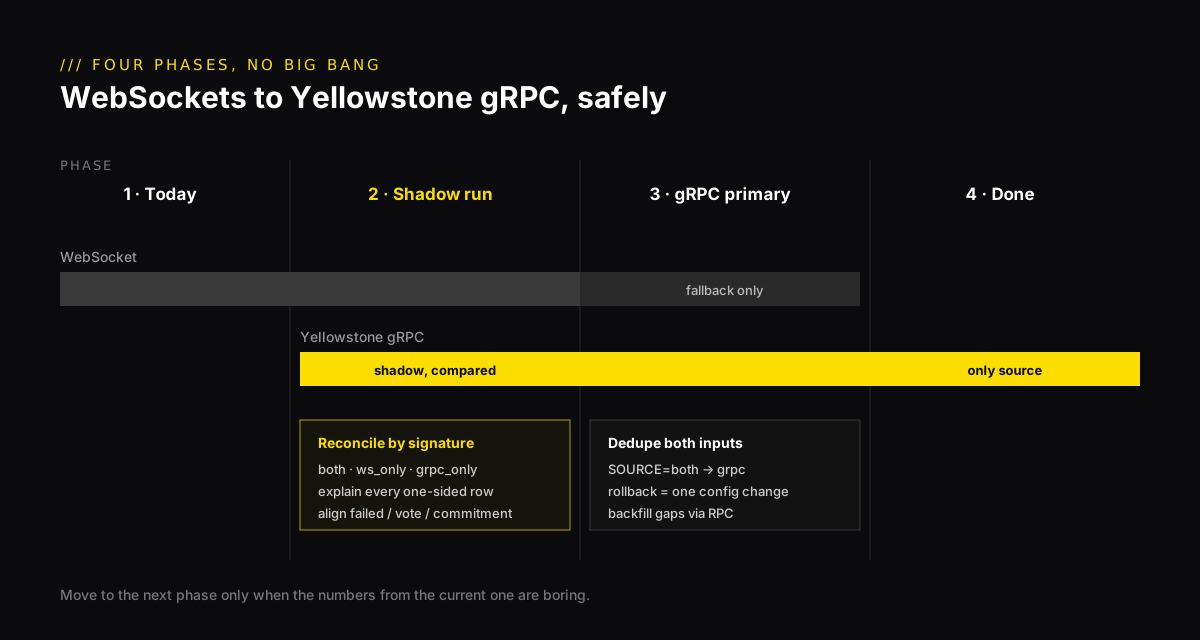
Timeline of a WebSocket to Yellowstone gRPC migration: WebSocket only, then both transports in a shadow run reconciled by signature, then gRPC primary with WebSocket as fallback, then gRPC only
Figure 1: Never switch transports in one deploy. The shadow-run phase is where you find out what the new stream sees differently.

02Step 1: Inventory your subscriptions#

Grep your codebase for every subscribe call and write down four things for each: the method, its parameters, the commitment level, and what the consumer does with a notification. Teams often find subscriptions nobody remembers opening, and leftover signatureSubscribe calls that were never cleaned up.

Then check your connection budget, because the two transports count differently. WebSocket plans limit concurrent connections. Yellowstone plans limit concurrent streams, and one stream carries many named filters. On NoLimitNodes, Pro allows 5 WebSocket connections and 2 gRPC streams; Ultra allows 20 and 10. Free includes neither. Most WebSocket setups collapse into one or two gRPC streams, so plan the grouping now.

03Step 2: Map each subscription to a Yellowstone filter#

Every standard Solana WebSocket subscription has a Yellowstone equivalent. Table 1 is the translation sheet.

WebSocket methodYellowstone filterWhat changes
accountSubscribeaccounts: { account: [pubkey] }Data arrives as bytes, not base64 or jsonParsed
programSubscribeaccounts: { owner: [program], filters }dataSize becomes datasize; memcmp takes base58, base64 or bytes
logsSubscribetransactions: { accountInclude: [addr] }You get the full transaction, not just logs; several addresses per filter
signatureSubscribetransactionsStatus: { signature }Stays open; you remove the filter yourself
slotSubscribeslots: {}One update per status change: processed, confirmed, finalized and more
blockSubscribeblocks: { accountInclude }Choose includeTransactions / includeAccounts explicitly
rootSubscribeslots: {}Watch for the finalized status instead
Table 1: WebSocket subscriptions and their Yellowstone gRPC equivalents. Field names are from the @triton-one/yellowstone-grpc TypeScript client.

A filtered programSubscribe is the one people get wrong most often, because the field names and value types differ slightly. Offsets and sizes are strings in the TypeScript client:

programSubscribe → accounts filter
typescript
// programSubscribe(PROGRAM, { filters: [{ dataSize: 165 }, { memcmp: { offset: 32, bytes: OWNER } }] })
// becomes:
accounts: {
  token_accounts: {
    account: [],
    owner: [PROGRAM],
    filters: [
      { datasize: '165' },
      { memcmp: { offset: '32', base58: OWNER } },
    ],
  },
},
WARNING / logsSubscribe is not a like-for-like swap
logsSubscribe accepts one address in mentions, so many WebSocket setups open one subscription per program. In Yellowstone, one accountInclude list covers them all. Merge them, but keep each old subscription’s purpose as a separate named filter. The filter names come back on every update, so your router still knows why it received a transaction.

04Step 3: Normalize both transports into one event#

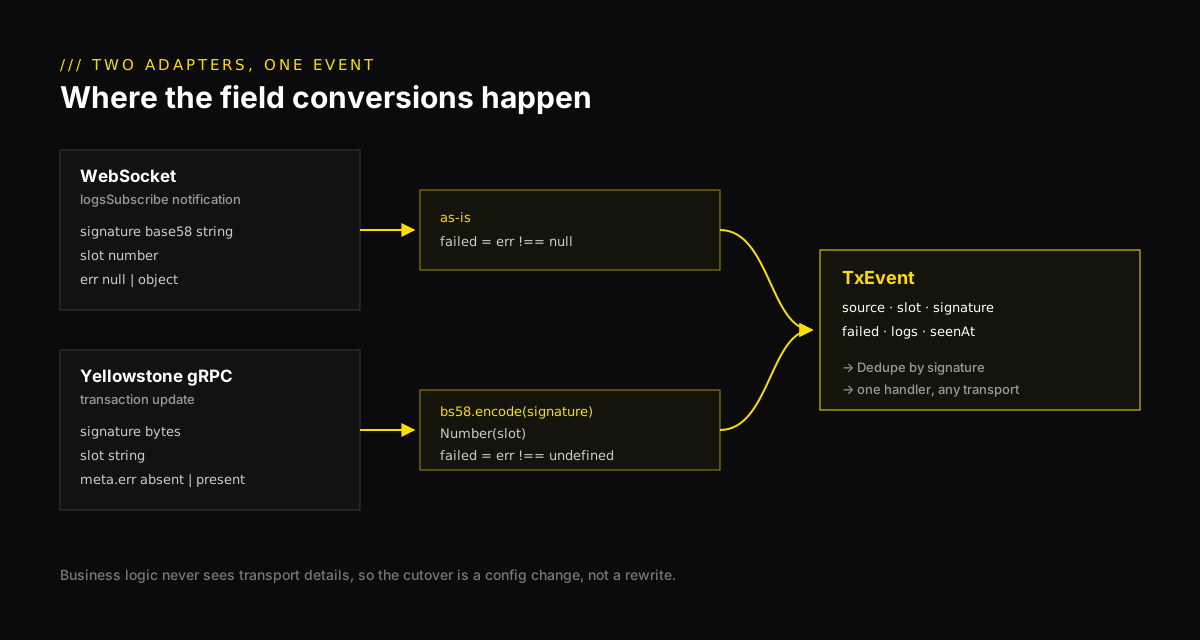
The single most useful thing you can do is make your business logic stop caring which transport delivered a transaction. Define one internal event type, write one adapter per transport, and route both into the same handler. That is what makes the shadow run and the cutover a configuration change, not a rewrite.

event.ts
typescript
// One internal shape, whatever transport produced it.
export interface TxEvent {
  source: 'ws' | 'grpc'
  slot: number
  signature: string
  failed: boolean
  logs: string[]
  seenAt: number // local receive time, ms
}

// Remember recent signatures so a transaction is handled once,
// even when both transports (or a reconnect backfill) deliver it.
export class Dedupe {
  private seen = new Map<string, number>()
  constructor(private max = 200_000) {}
  firstTime(sig: string): boolean {
    if (this.seen.has(sig)) return false
    this.seen.set(sig, Date.now())
    if (this.seen.size > this.max) this.seen.delete(this.seen.keys().next().value!)
    return true
  }
}

The WebSocket adapter uses the ws package, because NoLimitNodes expects the API key in an x-api-key header on the upgrade request and the browser-style WebSocket constructor cannot set headers.

ws-source.ts
typescript
import WebSocket from 'ws'
import type { TxEvent } from './event.js'

// logsSubscribe for one program, normalized to TxEvent.
export function wsSource(url: string, apiKey: string | undefined, program: string, onTx: (e: TxEvent) => void) {
  const ws = new WebSocket(url, { headers: apiKey ? { 'x-api-key': apiKey } : {} })
  ws.on('open', () => ws.send(JSON.stringify({
    jsonrpc: '2.0', id: 1, method: 'logsSubscribe',
    params: [{ mentions: [program] }, { commitment: 'confirmed' }],
  })))
  ws.on('message', data => {
    const r = JSON.parse(data.toString()).params?.result
    if (!r) return
    onTx({
      source: 'ws', slot: r.context.slot, signature: r.value.signature,
      failed: r.value.err !== null, logs: r.value.logs, seenAt: Date.now(),
    })
  })
  return ws
}

The gRPC adapter does the conversions that trip up most migrations: signatures arrive as bytes and need bs58, slots arrive as strings, and a failed transaction is marked by a present meta.err rather than a non-null one.
grpc-source.ts
typescript
import Client, { CommitmentLevel, type SubscribeRequest, type SubscribeUpdate } from '@triton-one/yellowstone-grpc'
import bs58 from 'bs58'
import type { TxEvent } from './event.js'

const EMPTY: SubscribeRequest = {
  accounts: {}, slots: {}, transactions: {}, transactionsStatus: {},
  blocks: {}, blocksMeta: {}, entry: {}, blockFooter: {}, accountsDataSlice: [],
}

// Yellowstone transactions filter for one program, normalized to TxEvent.
export async function grpcSource(endpoint: string, token: string | undefined, program: string, onTx: (e: TxEvent) => void) {
  const client = new Client(endpoint, token, { grpcMaxDecodingMessageSize: 64 * 1024 * 1024 })
  await client.connect()
  const stream = await client.subscribe()
  stream.on('data', (u: SubscribeUpdate) => {
    if (u.ping) return void stream.write({ ...EMPTY, ping: { id: 1 } })
    const t = u.transaction
    if (!t?.transaction) return
    onTx({
      source: 'grpc', slot: Number(t.slot), signature: bs58.encode(t.transaction.signature),
      failed: t.transaction.meta?.err !== undefined, logs: t.transaction.meta?.logMessages ?? [], seenAt: Date.now(),
    })
  })
  stream.write({
    ...EMPTY,
    transactions: {
      // vote and failed left unset: logsSubscribe also includes failed transactions
      main: { vote: false, accountInclude: [program], accountExclude: [], accountRequired: [] },
    },
    commitment: CommitmentLevel.CONFIRMED,
  })
  return stream
}
Two adapters, one for WebSocket logsSubscribe notifications and one for Yellowstone gRPC transaction updates, converting signature, slot and error fields into one TxEvent shape that feeds a single deduplicated handler
Figure 2: Two adapters, one event type, one handler. The conversions in the middle column are where silent bugs live.

05Step 4: Shadow-run and reconcile by signature#

Run both adapters against the same program and compare what each one saw. A transaction signature is globally unique, so it is the natural join key. Wait about a minute before judging a slot, so a late arrival on either side is not counted as missing.

shadow.ts
typescript
import type { TxEvent } from './event.js'
import { wsSource } from './ws-source.js'
import { grpcSource } from './grpc-source.js'

const PROGRAM = process.env.PROGRAM ?? 'CPMMoo8L3F4NbTegBCKVNunggL7H1ZpdTHKxQB5qKP1C'
const KEY = process.env.NLN_API_KEY
const seen = new Map<string, { slot: number; ws?: number; grpc?: number }>()
let tip = 0

function record(e: TxEvent) {
  const row = seen.get(e.signature) ?? { slot: e.slot }
  row[e.source] ??= e.seenAt
  seen.set(e.signature, row)
  tip = Math.max(tip, e.slot)
}

// Every 30 s, settle slots that are at least 150 slots old (~1 minute).
setInterval(() => {
  let both = 0, wsOnly = 0, grpcOnly = 0
  const leads: number[] = []
  for (const [sig, r] of seen) {
    if (r.slot > tip - 150) continue
    if (r.ws && r.grpc) { both++; leads.push(r.ws - r.grpc) }
    else if (r.ws) wsOnly++
    else grpcOnly++
    seen.delete(sig)
  }
  leads.sort((a, b) => a - b)
  const p50 = leads.length ? leads[Math.floor(leads.length / 2)] : NaN
  console.log(`both=${both} ws_only=${wsOnly} grpc_only=${grpcOnly} grpc_lead_p50=${p50}ms`)
}, 30_000)

wsSource('wss://ws.mainnet.solana.nolimitnodes.com', KEY, PROGRAM, record)
await grpcSource('https://grpc.mainnet.solana.nolimitnodes.com:443', KEY, PROGRAM, record)
terminal
bash
npm install @triton-one/[email protected] bs58@6 ws@8
npm install -D typescript tsx @types/node @types/ws
export NLN_API_KEY="your-api-key"
npx tsx shadow.ts

Each report line tells you three things: how many transactions both streams agreed on, how many only one side saw, and how much earlier gRPC delivered the shared ones. Let it run through busy and quiet periods before you trust it.

Align the filters before you compare

A mismatch is usually a filter difference, not a lost message. The most common one: logsSubscribe includes failed transactions, while most Yellowstone examples set failed: false. When we ran the WebSocket adapter above for 45 seconds against the Raydium CPMM program on 20 November 2026, 96 of 192 notifications (50%) were failed transactions. Compare that against a gRPC filter that drops failures and the WebSocket side appears to see twice as much. That is why the gRPC adapter above leaves failed unset.

  • Same commitment on both sides. Comparing processed against confirmed guarantees mismatches.
  • Same failed and vote settings. Decide whether failures matter to you, then filter both the same way.
  • Look up every one-sided signature. Fetch it with getTransaction and check how the program address appears in it. A difference that repeats is a filter rule to understand before cutover, not noise.

06Step 5: Cut over, keep a fallback, and close gaps#

Put the transport choice behind a setting such as SOURCE=ws|grpc|both. In both mode, send every event through the Dedupe class from step 3, so a transaction that arrives on both transports is handled once. Run both in production first, then switch to grpc, and keep the WebSocket path deployable for a few weeks.

Whatever transport you end on, connections drop. The safe pattern is the same for both: remember the last signature you handled, reconnect with exponential backoff, then ask plain RPC for everything you missed.

backfill.ts
typescript
import type { Dedupe } from './event.js'

async function rpc<T>(url: string, apiKey: string | undefined, method: string, params: unknown[]): Promise<T> {
  const res = await fetch(url, {
    method: 'POST',
    headers: { 'content-type': 'application/json', ...(apiKey ? { 'x-api-key': apiKey } : {}) },
    body: JSON.stringify({ jsonrpc: '2.0', id: 1, method, params }),
  })
  const body = await res.json()
  if (body.error) throw new Error(body.error.message)
  return body.result
}

type SigInfo = { signature: string; slot: number; err: unknown }

// After a reconnect, list every signature for the program newer than the last one you handled.
export async function backfill(url: string, apiKey: string | undefined, program: string, lastSig: string, dedupe: Dedupe) {
  const missed: SigInfo[] = []
  let before: string | undefined
  for (;;) {
    const page = await rpc<SigInfo[]>(url, apiKey, 'getSignaturesForAddress', [
      program, { until: lastSig, before, limit: 1000, commitment: 'confirmed' },
    ])
    for (const s of page) if (dedupe.firstTime(s.signature)) missed.push(s)
    if (page.length < 1000) break
    before = page[page.length - 1].signature
  }
  return missed.reverse() // oldest first, so you replay in order
}

We tested this against mainnet by pausing for 20 seconds on the Raydium CPMM program. Backfill returned the 92 signatures that landed in the gap, oldest first, and a second run returned only the handful that had arrived since. Fetch each one with getTransaction before handling it. On very busy programs the gap can be thousands of signatures, so budget RPC calls for it. The Yellowstone protocol also has a fromSlot replay option; read the keepalive and replay docs before relying on it instead of a backfill.

TIP / Remember to answer pings
A Yellowstone stream sends a ping every 15 seconds. Write a request with a ping id back, as the gRPC adapter does. A stream that never answers can be closed as idle by proxies and load balancers.

07Pre-cutover checklist#

CheckWhy it matters
Every WebSocket subscription has a named gRPC filterNothing silently stops arriving
Both sides use the same commitment, failed and vote settingsThe comparison means something
One-sided signatures were investigated and explainedYou understand the remaining differences
Signatures, pubkeys and account data are decoded from bytesIDs match your database and explorer
Slots are handled as strings or BigIntNo precision loss on uint64 values
Pings are answeredIdle streams stay open
Reconnect with backoff, then backfill from the last signatureGaps are closed, not ignored
WebSocket path still deployableYou can roll back in one config change
Table 2: Check each item before you switch the default transport.

08Frequently asked questions#

How long should I run WebSockets and Yellowstone gRPC side by side?

Long enough to cover your busiest and quietest periods, usually several days. Switch only when one-sided signatures are rare and each one is explained, for example by a filter difference you understand and have accepted.

Does Yellowstone gRPC include failed transactions?

Only if you ask for them. Leave failed unset to receive successful and failed transactions, or set it to false to drop failures. WebSocket logsSubscribe includes failed transactions, so align this setting before comparing the two streams.

Can one Yellowstone stream replace several WebSocket connections?

Usually, yes. One stream carries many named filters across accounts, transactions and slots, and each update reports which filters matched it. Group your WebSocket subscriptions into a few streams that fit your plan's stream limit.

What happens to my data when a gRPC stream disconnects?

Updates sent while you were disconnected are not redelivered by a plain subscription. Reconnect with backoff, then backfill from the last signature you handled with getSignaturesForAddress, and deduplicate by signature so nothing is processed twice.

Do I still need RPC after moving to Yellowstone gRPC?

Yes. Streams tell you what changed, but you still need RPC to load starting state, backfill gaps, fetch blockhashes and send transactions.

///

A WebSocket to Yellowstone gRPC migration is safe when it is boring: map every subscription, normalize to one event type, compare the two streams by signature until they agree, then switch with a way back. New to the gRPC client? Build your first Yellowstone gRPC client in the Academy first. Plans and stream limits are on our Yellowstone gRPC page, and the Solana WebSocket nodes stay available for the shadow run.

Related reading: Solana gRPC API guide · Backfill history and switch to live gRPC · How to evaluate a Solana data stream provider

#yellowstone-grpc#websocket#migration#solana-data#typescript#geyser#streaming
N
NoLimitNodes Engineering
Infrastructure Team

The team that runs our RPC, WebSocket, gRPC, and streaming fleet. We write about what we operate: validators, Geyser pipelines, and the request paths in between.

On this page
  • 01The migration in five steps
  • 02Step 1: Inventory your subscriptions
  • 03Step 2: Map each subscription
  • 04Step 3: Normalize to one event
  • 05Step 4: Shadow-run and reconcile
  • 06Step 5: Cut over and close gaps
  • 07Pre-cutover checklist
  • 08Frequently asked questions
↑ back to top
///Read next
GuidesMay 19, 2026

Yellowstone gRPC vs WebSockets: choosing a real-time Solana data pipeline

Both transports stream the same chain, but they come from different places inside the validator and fail in different ways. A field guide to choosing and operating the right pipeline for your workload.

#yellowstone#grpc#websocket
16 min read
EngineeringJun 17, 2026

Solana Geyser Plugin (2026): Build, Deploy & 6 Failure Modes

How the Agave Geyser plugin interface works, a complete Rust build from cargo new to mainnet, and the six production failure modes we have debugged on real customer plugins: variant mismatch, silent panic, startup double-count, and more.

#geyser#rust#solana
22 min read
///Relevant Solana infrastructure
Solana Program Streams

Per-program, per-instruction topics delivered in their source shape.

Explore Solana Program Streams →
Solana WebSocket Nodes

Standard Solana subscriptions for account, program, slot, and transaction updates.

Explore Solana WebSocket Nodes →
Yellowstone gRPC Nodes

Filtered Geyser streams for indexers, bots, and production data pipelines.

Explore Yellowstone gRPC Nodes →
← Older
How to Decode Jito Shreds: Turn Solana Shreds into Transactions
Run it yourself

Every benchmark in this blog runs against our public endpoints.

Spin up an RPC, WebSocket, or gRPC endpoint in under a minute. Flat monthly pricing. Reproduce the numbers for your own workload.

See pricing

Ready to get started?

Choose a plan and start building in under 30 seconds.

Talk to Sales
NoLimitNodes

Solana RPC infrastructure built for performance and scale.

RPC Access
  • Solana HTTP RPC nodes
  • Solana WebSocket nodes
  • Yellowstone gRPC nodes
  • Solana Shredstream
  • UltraSend transaction relay
Infrastructure
  • Compute Platform
  • VPS
  • VDS
  • Bare Metal
  • Geyser Plugin Hosting
Enhanced Streams
  • PumpFun
  • PumpSwap
  • Raydium
  • Orca
  • Meteora
  • System Events
  • Browse all Solana Enhanced Streams →
Program Streams
  • PumpFun
  • PumpSwap
  • Raydium CLMM
  • Orca Whirlpool
  • Meteora DLMM
  • Jupiter Swap
  • Jupiter Perps
  • Kamino Lending
  • Browse all 37 Solana programs →
Trading
  • EZWallet
Analytics
  • Historical Datasets
  • Historical Raw Blocks
Company
  • About
Resources
  • Pricing
  • RPC Rate Limits
  • Custom Development
  • Documentation
  • Blog
  • Academy
  • Support
  • Contact Sales
Compare
  • Yellowstone gRPC vs LaserStream
  • Triton vs Helius
  • Raydium API vs Helius
  • PumpSwap API vs Bitquery
  • QuickNode Streams vs NLN
  • All comparisons →
Legal
  • Terms & Conditions
  • Privacy Policy
© 2026 CLR3 Inc., operating as NoLimitNodes. Registered in Ontario, Canada. All rights reserved.solana mainnet