- Set up a TypeScript project with a pinned Yellowstone gRPC client
- Write a SubscribeRequest with slot and transaction filters
- Decode signatures and read logs from transaction updates
- Keep a stream open with pings and plan for reconnects
In this lesson
By the end of this walkthrough you will have a TypeScript script that opens one Yellowstone gRPC stream, receives every confirmed slot, and prints each successful transaction that touches a program you choose. It is about 50 lines, and every later streaming project starts from the same skeleton.
01What you will build#
Yellowstone gRPC streams data straight out of a validator’s Geyser plugin. Instead of asking an RPC node “anything new?” over and over, you open one long-lived connection, send filters describing what you want, and the server pushes matching updates as soon as they exist. If you are not sure gRPC is the right tool yet, start with 5 ways to get real-time Solana data.
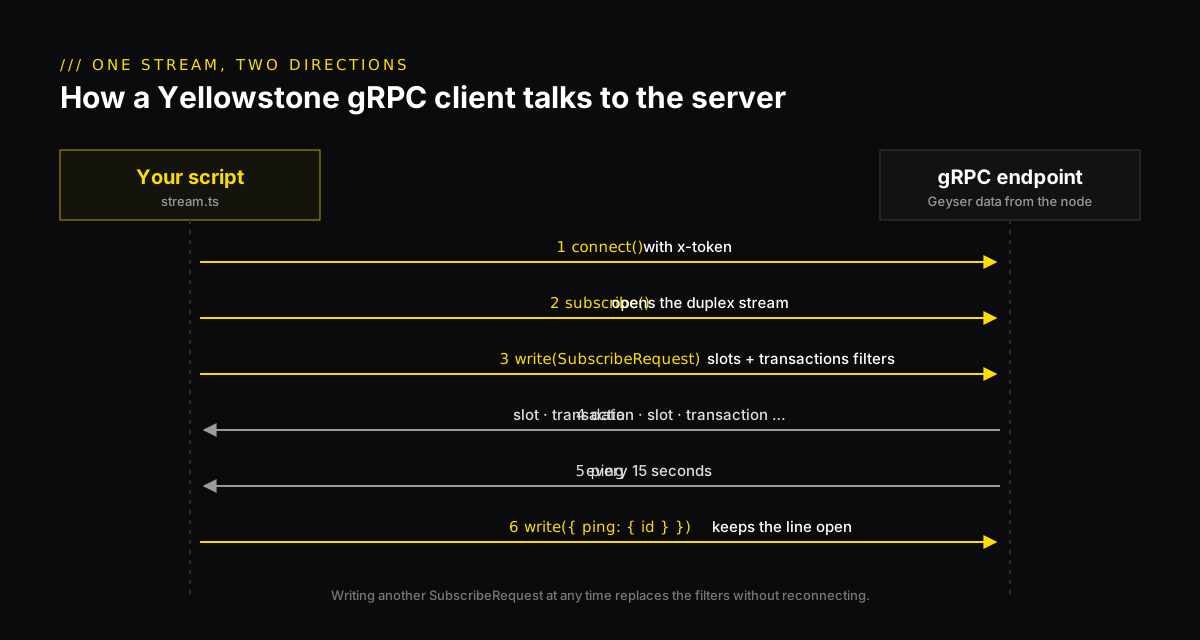
The finished script does four things:
- Connects to the gRPC endpoint with your API key.
- Subscribes to confirmed slots and to transactions that mention one program.
- Turns each transaction’s raw signature bytes into a readable base58 string.
- Answers the server’s pings so the connection stays open.
02Set up the project#
You need Node.js 20 or newer and a NoLimitNodes API key on a plan that includes gRPC streams (see the pricing page). Create a folder and install the client:
Add a tsconfig.json. The Bundler resolution setting matters: with NodeNext, TypeScript cannot find the client’s default export and reports This expression is not constructable.
03Connect to the endpoint#
The client takes three arguments: the endpoint URL, your token, and channel options. The SDK sends the token as x-token metadata. Raise the maximum message size, because full transactions and blocks can be bigger than the gRPC default.
client.subscribe() gives you a duplex stream. You write SubscribeRequest messages into it and read SubscribeUpdate messages out of it. Nothing arrives until you write your first request.
04Your first subscription: slots#
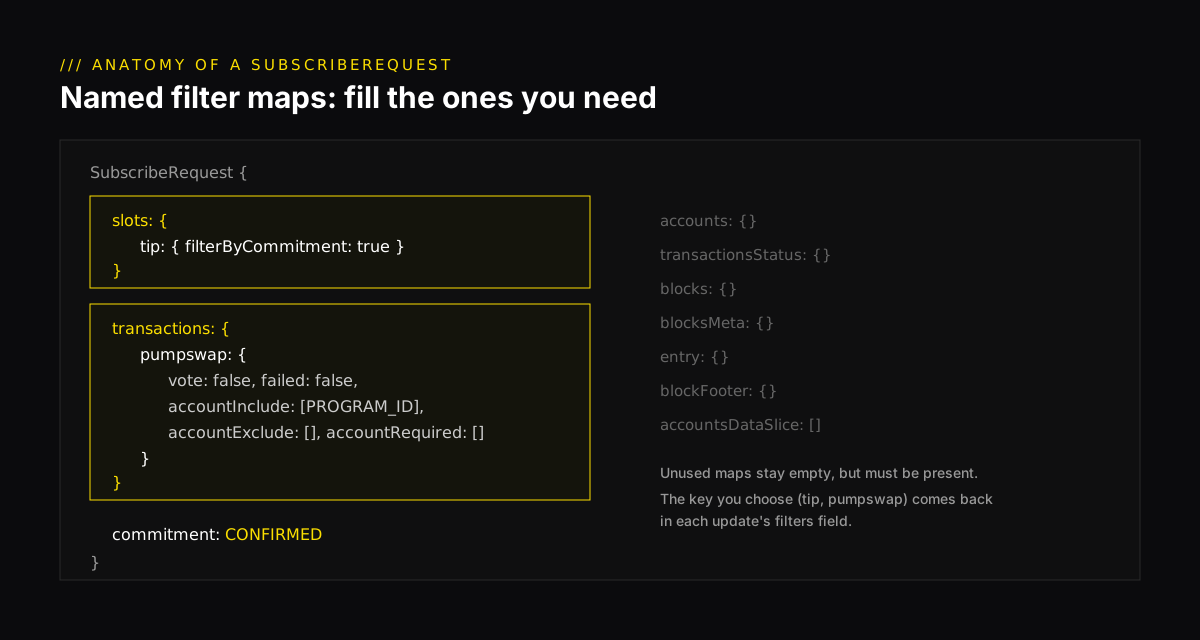
Start with the smallest possible stream, slots, to confirm the connection works. A SubscribeRequest is a set of named filter maps, one per kind of data. The name you give each filter (here tip) comes back in every matching update’s filters field, so you can tell several filters apart on one stream.
Run it with npx tsx stream.ts. A new slot number should print roughly every 400 milliseconds. If it does, your key, endpoint and client are all working.
05Filter transactions by program#
Now add a transactions filter. accountInclude matches any transaction that references at least one of the listed accounts, and a program ID counts as an account. This example uses the PumpSwap AMM, which is busy enough that you will see traffic right away. Swap in any program ID you care about.
Writing a new request on the same stream replaces your filters. You do not need to reconnect to change what you are watching.
06Read what comes back#
Every update has exactly one payload field set: slot, transaction, account, ping and so on. Check which one is present and handle it. Signatures and public keys arrive as raw bytes, so encode them with bs58 before you print them or look them up in an explorer.
Slot numbers come back as strings, not numbers, because a uint64 can exceed what a JavaScript number holds exactly. Keep them as strings, or convert them with BigInt.
07Keep the stream alive#
The server sends a ping update on open subscriptions every 15 seconds. Answer it by writing a request that carries a ping with an id (any integer works). Load balancers and proxies close connections that look idle, and answered pings keep yours open.
08When things go wrong#
UNAUTHENTICATED: the key is missing or wrong. Check thatNLN_API_KEYis exported in the same shell you run the script from.- Too many streams: each plan allows a fixed number of concurrent gRPC streams. On NoLimitNodes that is 2 on Pro and 10 on Ultra, and the Free plan has none. One stream can carry many named filters, so add filters before you add streams.
- The stream ends:
subscribe()never reconnects by itself. Wrap your setup in a function, retry with exponential backoff, and use RPC to fill any gap in your data. The SDK also hassubscribeWithReconnect(). Read the keepalive and replay docs before you rely on replaying missed slots.
09The full script#
Here is everything together. Press Ctrl+C to close the stream cleanly.
Next, put the transactions to work. In the new-pool alert bot walkthrough the same skeleton watches five DEX programs and prints an alert when a liquidity pool is created. For the same pattern in Python, see the Yellowstone gRPC Python guide. Endpoint details are in the Yellowstone gRPC quickstart, and plans are on the Yellowstone gRPC page.
Q1Your transactions filter has accountInclude set to one program ID. Which transactions do you receive?
Q2Why does the client write a request with a ping id when it receives a ping update?
Q3A transaction update arrives. What format is tx.signature in?
Frequently asked questions#
Which npm package do I use for Yellowstone gRPC in TypeScript?
@triton-one/yellowstone-grpc, the official Node.js client. Pin the version in your lockfile, because request fields change between releases. This walkthrough was type-checked against 10.0.0.
Can I use Yellowstone gRPC from a browser?
No. Browsers cannot open the long-lived bidirectional gRPC stream it needs. Run the client on a server or in a backend process, and push results to the browser over a WebSocket if you need to.
How do I change filters without reconnecting?
Write a new SubscribeRequest on the same stream. It replaces the filters of the live subscription.
How many gRPC streams can I open on NoLimitNodes?
It depends on the plan: Pro includes 2 concurrent streams and Ultra includes 10. The Free plan does not include gRPC streams. One stream can carry many named filters.