- Fetch a blockhash at the right commitment and track its expiry height
- Set a compute unit limit from simulation and a priority fee from recent demand
- Rebroadcast a signed transaction safely and read its status
- Decide when it is safe to rebuild a transaction without sending it twice
In this lesson
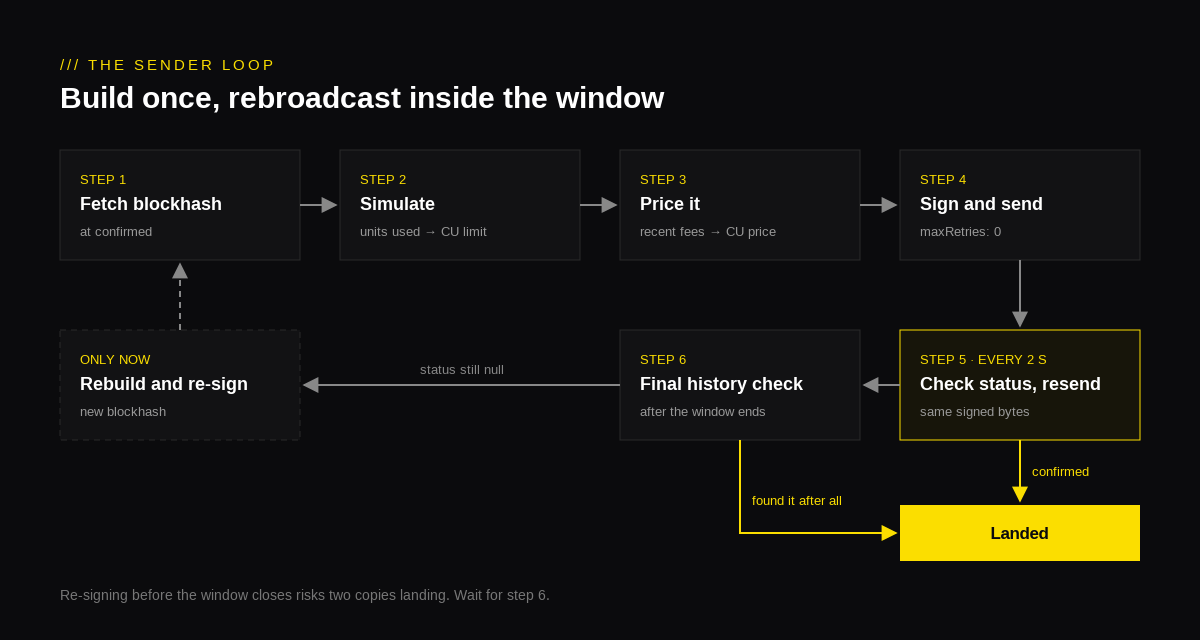
Calling sendTransaction on the Solana RPC API gives you a signature almost instantly. That signature only means a node accepted your transaction for forwarding. It says nothing about whether a leader will include it. In this walkthrough you build a TypeScript sender that does the rest: a blockhash at the right commitment, a compute limit measured by simulation, a priority fee based on recent demand, and a loop that rebroadcasts until the transaction confirms or provably can't.
01What you will build#
One script, about 90 lines, that sends a small SOL transfer and reports whether it landed. The transfer is a stand-in: replace it with your own instructions and everything else stays the same. Along the way you'll use six Solana RPC API methods, in this order:
getLatestBlockhashto get a blockhash and the block height at which it expiressimulateTransactionto measure how many compute units the transaction needsgetRecentPrioritizationFeesto see what recent transactions paid for the same accountssendTransaction(viasendRawTransaction) to submit the signed bytesgetSignatureStatusesto find out whether it landedgetBlockHeightto know when to stop waiting
You should know what slots, blocks and commitment levels are before starting. If RPC itself is new to you, read what a Solana RPC node does first.
02Set up the project#
You need a mainnet keypair with a little SOL in it: enough for the transfer plus fees. Each signature costs a base fee of 5,000 lamports (0.000005 SOL). Run the script with npx tsx send.ts.
03Connect and describe the work#
Create a connection with confirmed as the default commitment, load the payer, and list the instructions you want to run. Your API key goes in the x-api-key header.
04Step 1: fetch a blockhash at the right commitment#
Every transaction carries a recent blockhash. It proves the transaction is fresh, and it sets a deadline: the transaction is only valid while that blockhash is among the last 150 blocks, which is roughly 60 to 90 seconds. getLatestBlockhash returns the hash together with lastValidBlockHeight, the last block height at which the transaction can still land. Keep it. The whole sender loop depends on it.
The commitment you fetch at matters more than it looks:
The build function puts two compute budget instructions in front of yours: one sets the compute unit limit, the other the price per unit. Steps 2 and 3 work out the values.
05Step 2: simulate to set the compute limit#
Every transaction has a compute unit limit. If you don't set one, the runtime uses 200,000 units per instruction, up to a maximum of 1,400,000. Most transactions use far less. That matters because your priority fee is charged on the limit you request, not on what you use.
So measure first. simulateTransaction runs the transaction against current state without sending it and returns unitsConsumed. Simulate with the maximum limit so the simulation can't fail for lack of compute, then set the real limit to what was used plus about 10% headroom, because state can change between simulation and execution.
sigVerify: falselets you simulate before signing.replaceRecentBlockhash: truemakes the node use its own latest blockhash, so a draft never fails simulation on blockhash grounds.- When simulation fails, the logs tell you why. Fix that before sending: a transaction that fails in simulation will almost always fail on-chain too, and you still pay its fees.
For reference, the transfer in this walkthrough simulates at 450 units on mainnet: 150 for each of the two compute budget instructions and 150 for the transfer. With headroom, the limit becomes 495.
06Step 3: set a priority fee from recent demand#
Leaders order transactions partly by what they pay per compute unit. You set that with setComputeUnitPrice, in micro-lamports (a millionth of a lamport) per compute unit. The fee you actually pay is the limit times the price:
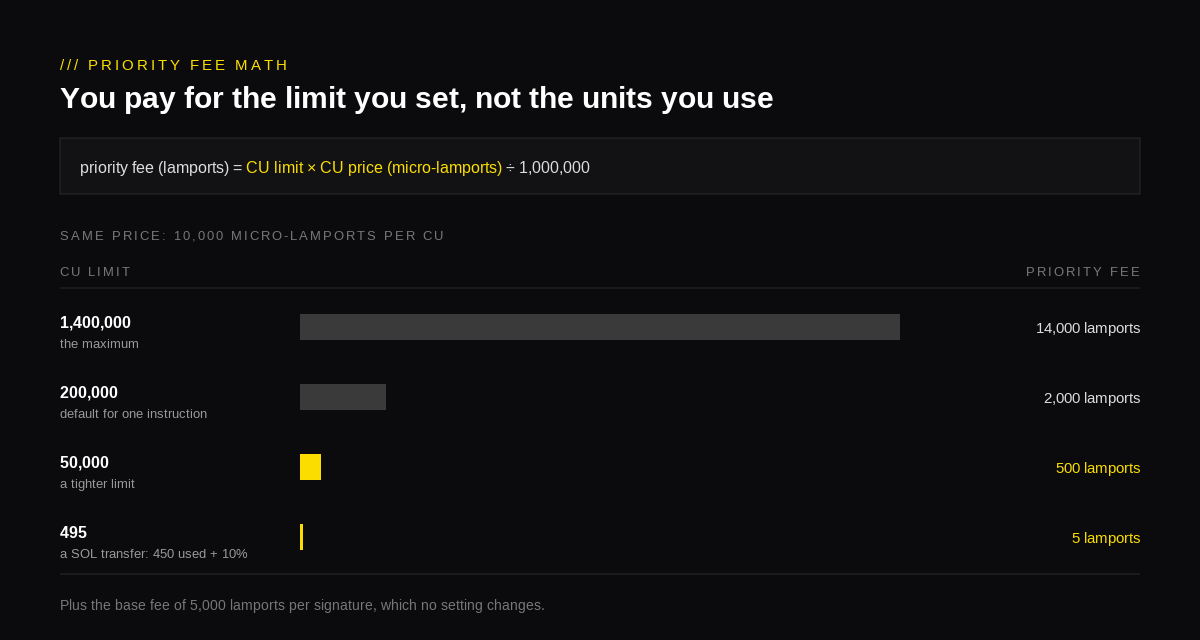
To pick a price, ask getRecentPrioritizationFees what recent transactions paid. Pass the accounts your transaction writes to. Fee pressure on Solana is local: a busy pool or a popular mint can be expensive while the rest of the chain is quiet, and an empty account list only tells you about the chain as a whole. The method returns one value per recent slot, up to 150 of them. Take a percentile and cap it.
Don't be surprised if every value comes back as 0. For accounts nobody else is writing to, that is the normal answer, and a price of 1 micro-lamport is enough. The 75th percentile and the ceiling are starting points: raise the percentile if you compete for hot accounts, and set the ceiling to what a landed transaction is worth to you.
07Step 4: sign and send with maxRetries set to 0#
Two options do the work here:
maxRetries: 0tells the RPC node not to rebroadcast on your behalf. By default the node retries for you, but you can't see when it gives up. With your own loop you always know the transaction's state.skipPreflight: trueskips the node's own simulation. You already simulated in step 2, so a second simulation only adds delay.
08Step 5: check status and rebroadcast#
Now poll getSignatureStatuses. Each time it comes back empty, check the block height and resend the exact same bytes. Resending is safe: a signature can only be processed once, so extra copies of the same transaction are dropped.
The status tells you one of three things:
A failed transaction is still a landed transaction. It used compute and paid fees. That's why the loop checks err before it checks the commitment level.
09Step 6: when the window closes, check before you rebuild#
Once the confirmed block height passes lastValidBlockHeight, your transaction can never land. This is the only safe moment to rebuild it with a fresh blockhash. Rebuilding means re-signing, and a re-signed transaction has a new signature. If you rebuild while the old one is still valid, both copies can land. For a transfer or a trade, that means doing it twice.
Before rebuilding, look one last time, including the node's longer history, in case the transaction landed between your last poll and the expiry:
If the status is still null, it never landed. Run steps 1 to 5 again with a fresh blockhash, a fresh simulation and a fresh fee. The full script below gives up after three attempts.
10When things go wrong#
getSignatureStatuses accepts up to 256 signatures per call. If you send many transactions, check them together instead of one request each. Our guide to sizing Solana RPC throughput helps you work out how many requests per second a sender like this needs.
11The full script#
For the bigger picture (commitment levels, rate limits and when RPC is the wrong tool), read the Solana RPC guide.
Q1At which commitment should you fetch the blockhash for a new transaction?
Q2You set a limit of 50,000 compute units and a price of 20,000 micro-lamports per unit. What is the priority fee?
Q3Your transaction is still unconfirmed after 20 seconds, and its blockhash has not expired. What should you do?
Q4getSignatureStatuses returns a status with err set. What does that mean?
Frequently asked questions#
Why did sendTransaction return a signature for a transaction that never landed?
The signature is computed from your signed transaction, and the RPC node returns it as soon as it accepts the transaction for forwarding. Landing depends on a leader including it before its blockhash expires, so confirm with getSignatureStatuses.
How long is a Solana blockhash valid?
For 150 blocks, which is roughly 60 to 90 seconds. getLatestBlockhash returns lastValidBlockHeight along with the hash. Once the chain passes that height, the transaction can never land and must be rebuilt.
How do I choose a Solana priority fee?
Call getRecentPrioritizationFees with the accounts your transaction writes to, take a percentile of the recent values, and cap it at what the transaction is worth to you. Pair it with a compute limit measured by simulation.
Is it safe to resend the same Solana transaction?
Yes. A signature can only be processed once, so resending the same signed bytes cannot execute twice. Re-signing with a new blockhash is different: it creates a new transaction, so only do it after the old one has expired.
Should I use skipPreflight?
Skip preflight only when you have already simulated, as this walkthrough does in step 2. Otherwise leave it on, because preflight catches errors such as missing funds before the transaction reaches a leader.