- Subscribe to several DEX programs on one Yellowstone gRPC stream
- Attribute log lines to the program that wrote them
- Recognise pool-creation instructions on five DEX programs
- Turn a raw transaction into an alert with mints and an explorer link
In this lesson
New liquidity pools appear on Solana all day, spread across several DEXes that each create them a different way. In this walkthrough you build a small TypeScript bot that watches Raydium, Meteora, Orca and PumpSwap over one Yellowstone gRPC stream, and prints an alert with the token mints and an explorer link the moment a pool is created.
01How the bot works#
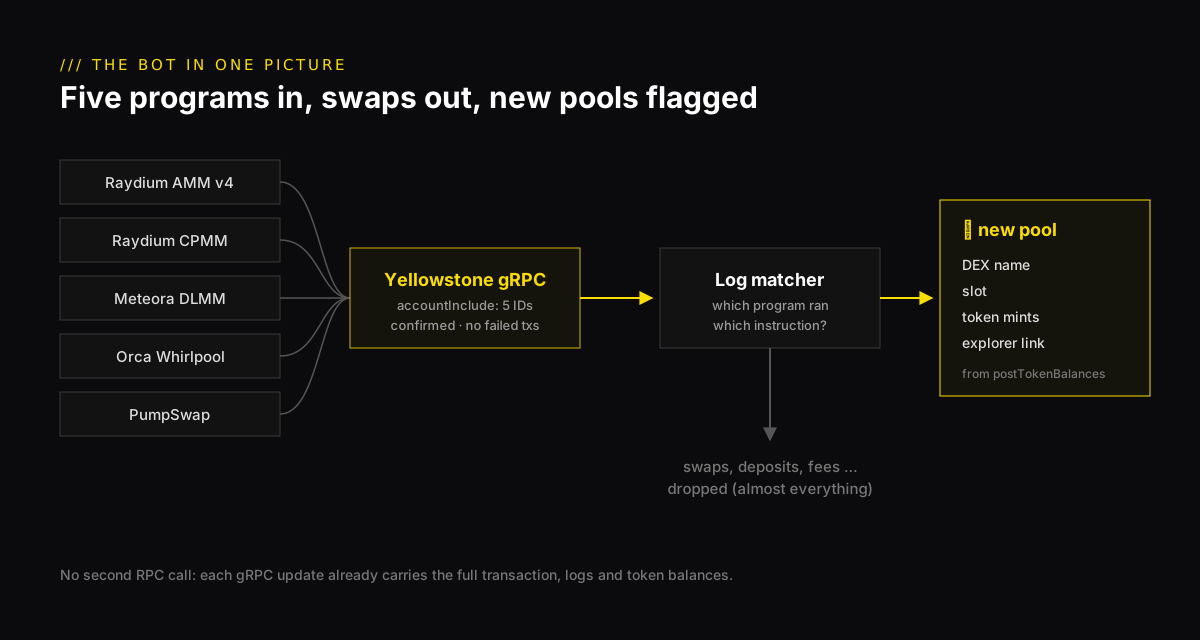
Every pool starts life as one transaction that calls a DEX program’s create instruction. The bot streams every successful transaction that touches one of five DEX programs, reads its log lines to see which instruction ran, and alerts when it finds a pool creation.
This builds on your first Yellowstone gRPC client. If you have not done that walkthrough, start there: it explains the connection, the request format and the ping handling that this bot reuses.
02The programs to watch#
Each DEX is its own on-chain program, with its own name for the create instruction. Anchor-based programs write the instruction name to the logs as Program log: Instruction: <Name>. Raydium AMM v4 predates Anchor and writes its own line, starting initialize2.
Some programs have more than one create instruction. Meteora DLMM, for example, also has customizable and permissioned variants, and Orca has a V2 for Token-2022 mints. The patterns below match the whole family. PumpSwap’s CreatePool is also what runs when a PumpFun token graduates, so the bot catches graduations for free.
03Set up#
The setup matches the first walkthrough: Node.js 20 or newer, a NoLimitNodes API key on a plan that includes Yellowstone gRPC, and the same tsconfig.json.
04Subscribe to five programs#
One transaction filter covers all five DEXes: accountInclude matches a transaction that touches any of the listed accounts. Two choices in this filter matter:
failed: falsedrops create attempts that failed. A failed transaction created nothing, so alerting on it would be a false alarm.- Confirmed commitment. Processed is a few hundred milliseconds earlier, but a processed block can still be dropped. For an alert a person might act on, confirmed is the safer default. The commitment lesson explains the trade-off.
Almost everything this filter lets through is swaps, many per second. The next step throws them away.
05Detect pool creations in the logs#
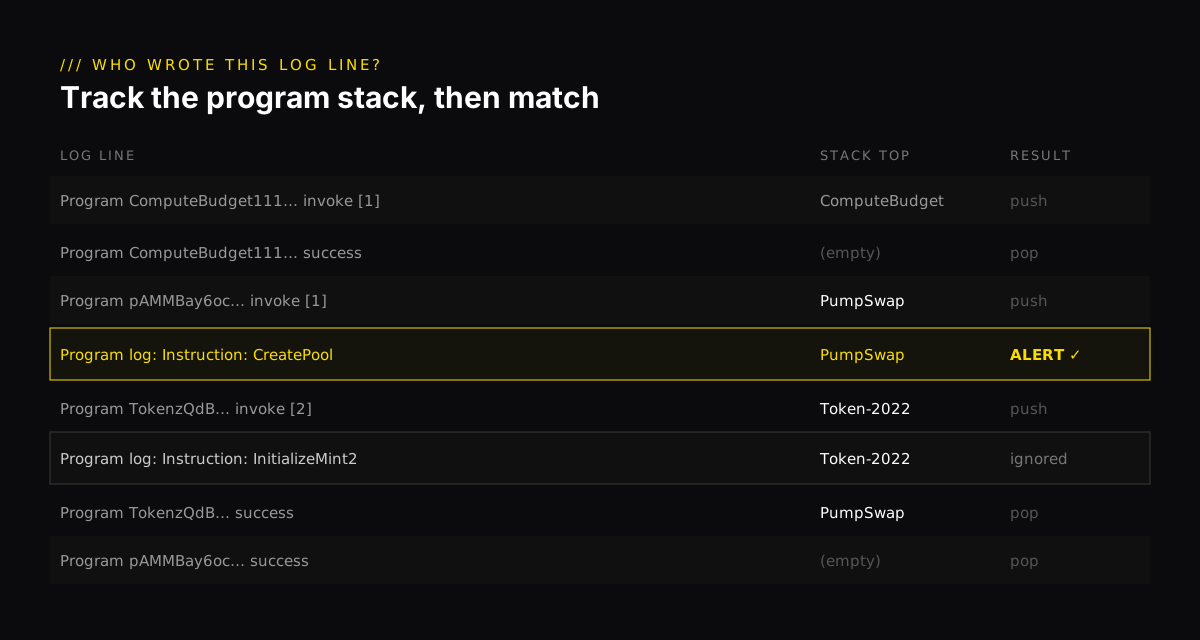
A transaction’s logs record every program it called, in order, with a log line when each call starts and ends. That matters, because many programs log the same instruction names. A bare Instruction: Initialize could come from the token program, a wallet or a router. The bot keeps a stack of which program is running and only checks a line against the DEX that wrote it.
06Print the alert#
When a creation is found, the bot pulls the token mints from the transaction’s postTokenBalances, which lists every token account the transaction left behind. A new pool usually shows the new token and the one it is paired against, most often wrapped SOL (So111…112). Some DEXes mint an LP token for the pool in the same transaction, so you may see a third mint.
Because Yellowstone sends the whole transaction, there is no second RPC call to look anything up. That is the main advantage over logsSubscribe on a WebSocket, which takes one address per subscription and sends only log lines.
07The full bot#
Two files. detect.ts holds the program table and the log matcher:
pool-bot.ts connects, subscribes and alerts. Run it with npx tsx pool-bot.ts.
Leave it running. PumpSwap pools from PumpFun graduations usually show up first, because they are the most frequent. Open the explorer link on the first alert and check that the transaction really created a pool.
08Make it yours#
- Send alerts somewhere useful. Replace
console.logwith a POST to a Telegram or Discord webhook. - Screen the token. Before anyone trades a new token, check whether its mint and freeze authorities are still active. Our token risk scanner guide shows how.
- Reconnect. The stream ends if the connection drops. Wrap the setup in a function and retry with exponential backoff, as in the first walkthrough.
- Go deeper. Our guide to detecting new Solana liquidity pools covers more DEXes, pool fields and edge cases such as graduations.
Q1Why does the bot track which program is running before it matches an "Instruction: Initialize" log line?
Q2The bot subscribes at confirmed commitment instead of processed. What does that buy you?
Q3A new-pool alert lists two token mints. One of them is So11111111111111111111111111111111111111112. What is it?
Frequently asked questions#
How do I detect new liquidity pools on Solana?
Subscribe to transactions that mention each DEX program, at confirmed commitment, and look for that program's pool-creation instruction, such as CreatePool on PumpSwap or InitializeLbPair on Meteora DLMM. The instruction name appears in the program's log lines.
Why not use logsSubscribe over WebSocket?
logsSubscribe accepts only one address per subscription and sends logs without token balances. Yellowstone gRPC covers all five programs in one filter and includes the full transaction, so the bot can read the mints without a second RPC call.
Can the bot buy automatically?
This walkthrough only alerts. Buying the moment a pool appears means competing with bots that see shreds before execution, and new pools carry real risks such as rugs and honeypots. Check a token's mint and freeze authority before trading it.
Does it catch PumpFun graduations?
Yes. When a PumpFun token graduates, a PumpSwap pool is created for it, and the bot reports it under PumpSwap.